

Handling email delivery within containerized environments poses unique challenges, especially when traditional mail transfer agents (MTAs) are absent. Docker, as a highly efficient containerization platform, isolates applications in lightweight environments that do not inherently include local mail servers. Consequently, implementing reliable email functionality in Dockerized PHP applications requires alternative approaches that circumvent the lack of a native mail server.
By integrating PHPMailer with SMTP services within Docker containers, developers can seamlessly send emails without depending on a local MTA. SMTP servers act as intermediaries to relay email messages externally, offering both secure transmission and robust authentication mechanisms. Docker Compose simplifies orchestration by managing environment configurations and container dependencies for PHP applications requiring email capabilities.
Mastering these tools and protocols enables developers to achieve flexible, secure, and maintainable email delivery workflows directly from their containerized PHP applications. This guide explores configuring PHPMailer in Docker environments, leveraging SMTP services, addressing typical challenges encountered, and implementing advanced email features like HTML content and attachments, all without relying on a local mail server.
What matters:
- PHPMailer in Docker bypasses the need for a local MTA by directly communicating with SMTP servers.
- Proper setup of environment variables and Docker Compose configurations is essential for secure email delivery.
- Email content can encompass plaintext, HTML, attachments, and multiple recipients within Dockerized PHP applications.
- Using external SMTP services like Mailtrap or other email providers secures reliable mail transmission.
- Common troubles such as environment variable recognition and network connectivity issues have specific diagnostics within Docker containers.
Understanding PHPMailer in Docker: Why Sending Mail Without a Local MTA Is Crucial
The error or challenge that developers often face is how to send mail from a Docker container when there is no local mail transfer agent (MTA) like sendmail or postfix installed. Essentially, the message “PHPMailer in Docker: Sending Mail Without a Local MTA” highlights the difficulty of email delivery in Docker’s isolated environment. By design, Docker containers do not include an MTA, causing native PHP mail functions that rely on local sendmail binaries to fail.
At the protocol level, sending email involves the Simple Mail Transfer Protocol (SMTP), which governs communication between email clients and mail servers. Without an MTA, PHP applications cannot directly hand off emails to the appropriate sender infrastructure. PHPMailer solves this by acting as an SMTP client to connect explicitly to a remote SMTP server, authenticating, and delivering the message through established channels.
This means that instead of attempting a local sendmail relay, PHPMailer establishes a TCP connection on the SMTP port (typically 25, or 587 for submission with STARTTLS) to an external, fully functional mail server. From the containerized PHP app’s perspective, the mail server acts as a reliable mail gateway, handling all the complexities of message queuing, relay, and delivery.
The fundamental distinction is whether the email composition library expects a local MTA or an external SMTP server. Docker containers lack the local agent, so explicit SMTP configuration becomes mandatory. This configuration includes specifying the SMTP host, port, user authentication credentials, encryption method (TLS/SSL), and sender details within PHPMailer.
To confirm the absence of a local MTA inside a Docker container, one can try running command-line tools like sendmail or mail. If these are absent or non-functional, it verifies that emails must be sent through SMTP. Running php -i | grep sendmail_path inside the container will often reveal that PHP is not configured to use a local mail transfer agent, necessitating direct SMTP client usage.
In summary, the problem emphasizes shifting from assumed local mail service dependency to explicit, networked SMTP communication within Docker’s isolated setting, a crucial adaptation for contemporary containerized PHP email applications.
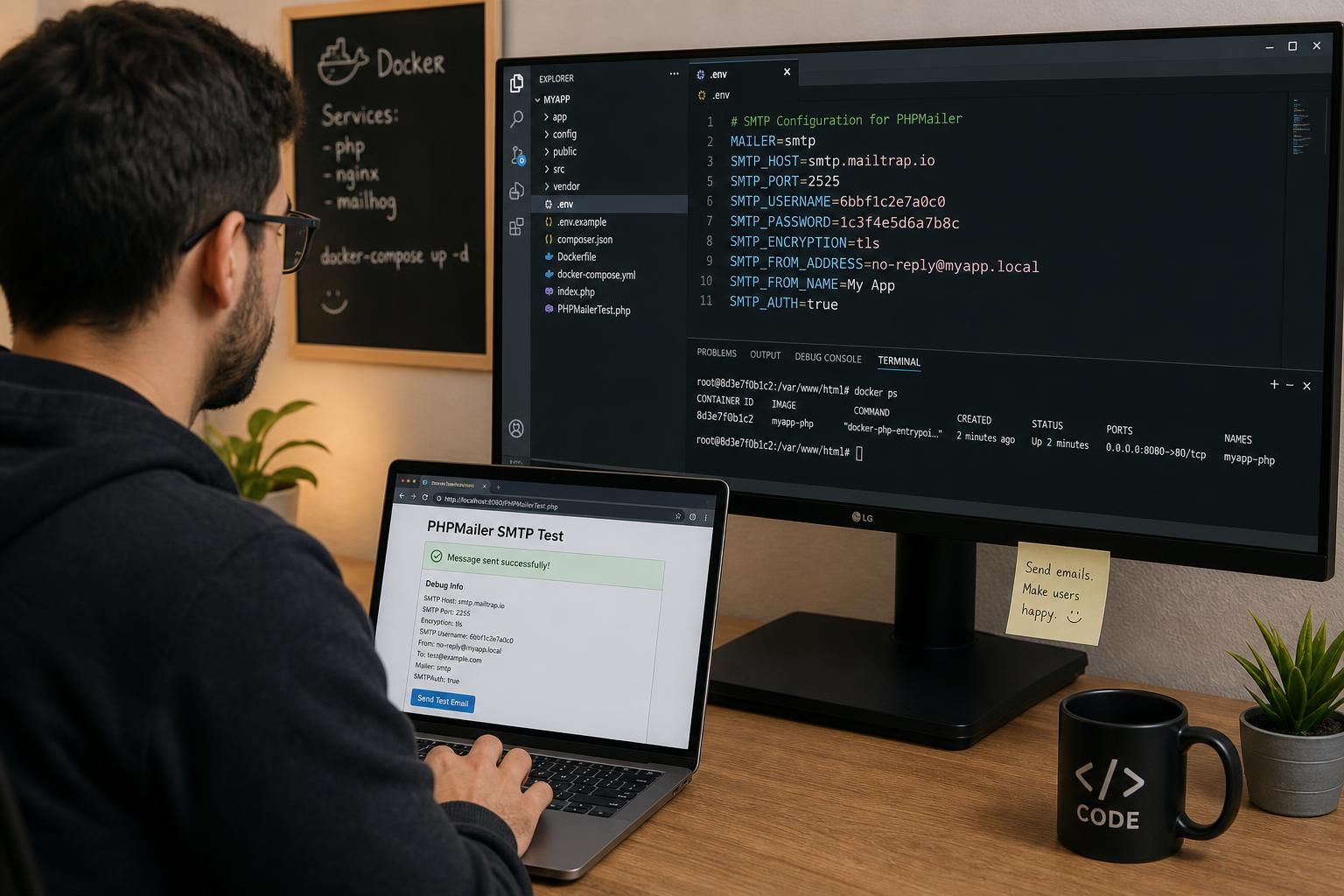
Configuring PHPMailer with External SMTP Servers in Docker: Confirming Proper SMTP Setup
One common cause of sending mail issues in Dockerized PHP environments is improper or missing configuration of PHPMailer to use an external SMTP server. Unlike traditional environments, Docker containers lack local MTAs, so PHPMailer must be explicitly set to connect to a remote SMTP host.
To identify and confirm this cause, first verify the SMTP connection details provided to PHPMailer. These include:
- SMTP Hostname: The domain or IP address of the SMTP mail server.
- Port Number: Usually 587 for STARTTLS or 465 for SSL connections.
- SMTP Authentication: Correct username and password credentials.
- Encryption Method: TLS or SSL must be enabled as supported by the server.
In Docker, environment variables commonly provide these values. A missing or incorrectly set environment variable will result in PHPMailer failing to connect or authenticate with the SMTP server. To distinguish this cause from others, observe the detailed SMTP debug output by enabling PHPMailer’s debug mode:
$mail->SMTPDebug = 2;
This verbose output reveals connection attempts, handshake transactions, response codes, and error messages. For detailed guidance on SMTP debug output and interpretation, refer to the SMTPDebug documentation.
An example test inside the Docker container:
- Ensure environment variables SMTP_HOST, SMTP_PORT, SMTP_USER, SMTP_PASS are set using a Bash script or docker-compose file.
- Run a simple PHP script with PHPMailer configured to connect to the SMTP server.
- Check error logs and SMTP debug output for authentication failures, connection timeouts, or protocol errors.
Successful SMTP connection confirms PHPMailer’s correct external mail server configuration. Failures here typically denote network issues or wrong credentials, separate from code bugs or local service failures.
This method distinctly separates SMTP configuration issues from other causes such as PHP extension misconfigurations or firewall blocks.
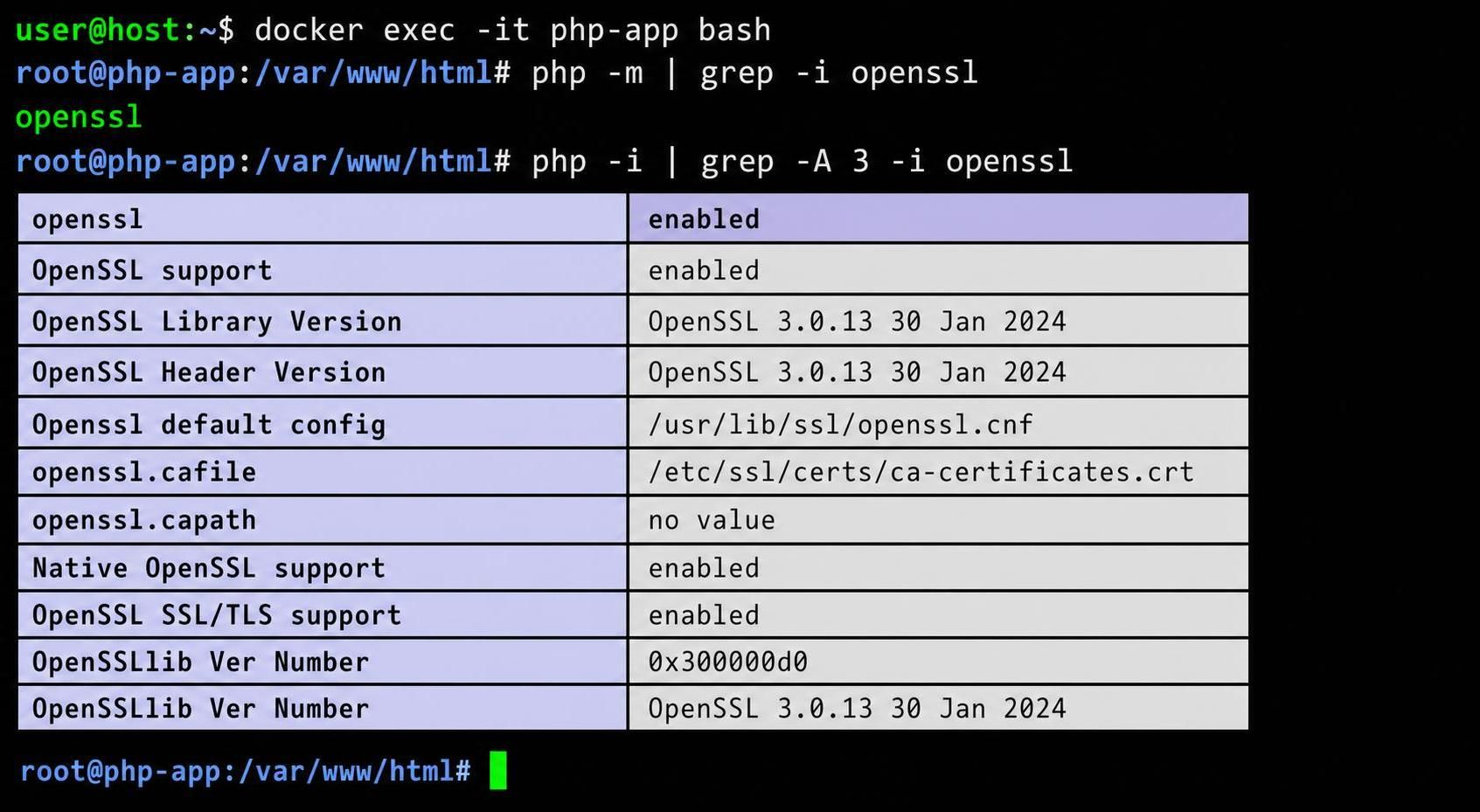
Ensuring OpenSSL and PHP Extensions Are Enabled in Docker Containers
PHPMailer relies on PHP’s OpenSSL extension to establish secure SMTP connections via TLS or SSL. If OpenSSL is not enabled in PHP within your Docker container, encrypted SMTP connections will fail, leading to authentication errors or protocol negotiation failures.
You can confirm whether OpenSSL is enabled by running inside the container:
php -r "phpinfo();" | grep -i openssl
If no OpenSSL section appears or it is disabled, enable it by editing php.ini to uncomment extension=openssl, then rebuild your Docker image and restart the container. This step is crucial for secure email delivery.
Using Docker Compose and Environment Variables for Secure Mail Server Credentials
Another frequent cause hindering mail sending from Docker containers is missing or insecure configuration of environment variables, which define sensitive SMTP credentials at runtime. Because storing credentials in the Dockerfile is insecure and inflexible, environment variables provide a cleaner, safer solution.
Docker Compose enables centralized definition and injection of environment variables such as:
- SMTP_HOST: Mail server address.
- SMTP_USER: SMTP username.
- SMTP_PASS: SMTP password.
- SMTP_PORT: SMTP port number.
To confirm if missing environment variables are the cause, test inside the container running:
printenv SMTP_USER
If variables are unset or incorrect, PHPMailer cannot establish authenticated sessions. Ensuring correct variable definition within a docker-compose.yml file or a sourced Bash script is essential.
Example snippet of docker-compose.yml:
version: '3.8'
services:
  php-mailer:
    build: .
    environment:
      SMTP_HOST: ${SMTP_HOST}
      SMTP_USER: ${SMTP_USER}
      SMTP_PASS: ${SMTP_PASS}
      SMTP_PORT: ${SMTP_PORT}
    volumes:
      - .:/app
Environment variables can be set locally in a Bash script file such as setup_env.sh:
#!/bin/bash
export SMTP_HOST='smtp.mailtrap.io'
export SMTP_USER='usernamehere'
export SMTP_PASS='passwordhere'
export SMTP_PORT=2525
Running source ./setup_env.sh before invoking docker-compose up --build loads these variables into the environment.
This technique distinguishes missing credential issues from network or protocol problems by verifying variable availability prior to container start.
Advanced Email Features with PHPMailer in Docker: Handling HTML Emails, Attachments, and Multiple Recipients
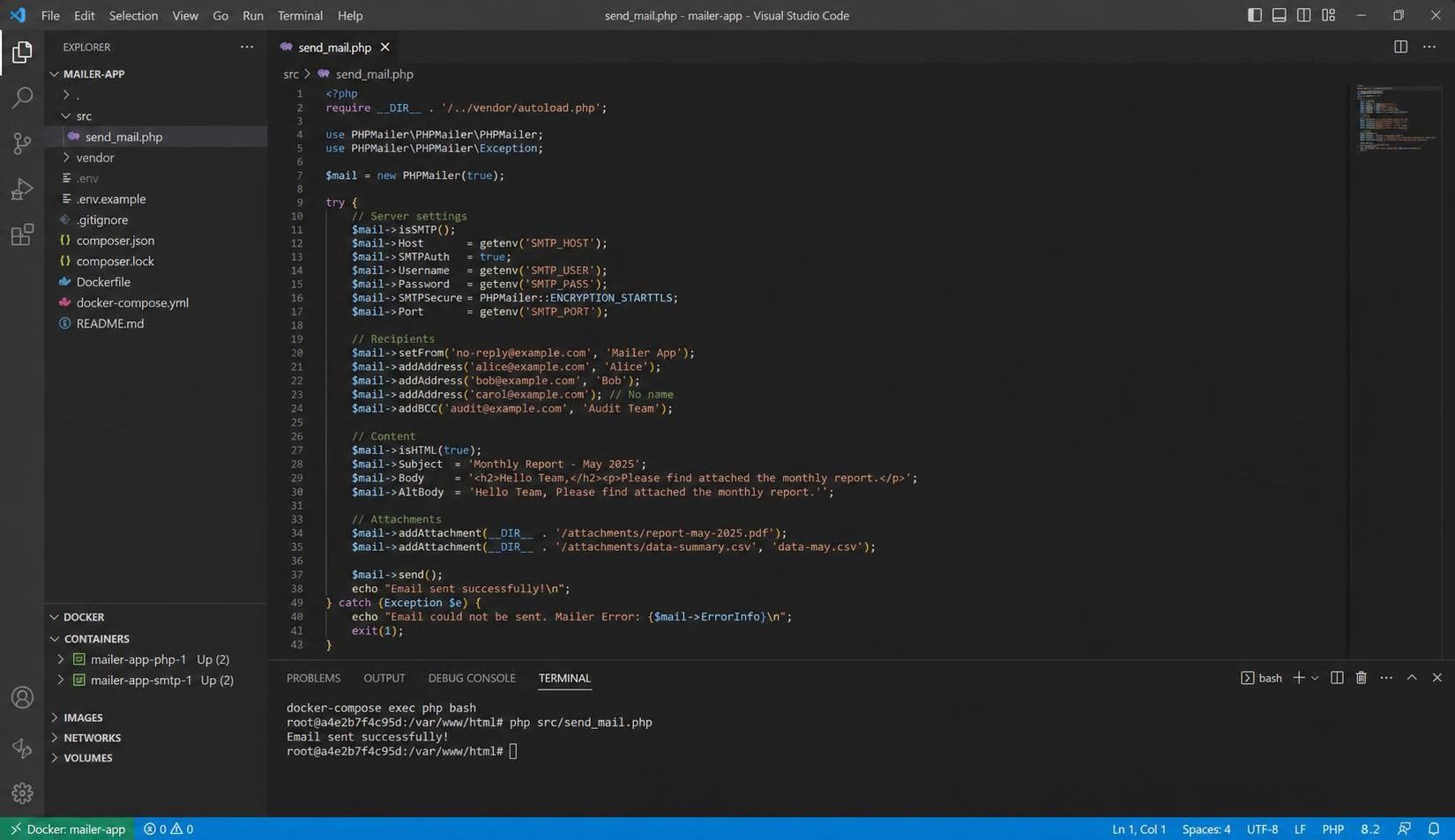
After establishing a robust SMTP connection within Docker containers, the next operational layer involves configuring PHPMailer for advanced email functionality. Built-in support for HTML formatted emails, attachments, and addressing multiple recipients proves essential in modern email delivery workflows.
Sending HTML Emails: By calling $mail->isHTML(true); in your PHP script, you instruct PHPMailer to format the email body in HTML. This enables rich content like headings, paragraphs, and embedded images.
Example snippet:
$mail->isHTML(true);
$mail->Subject = 'HTML Email Example';
$mail->Body = '<h1>Welcome</h1><p>This is an HTML email.</p>';
$mail->AltBody = 'This is the plain text fallback.';
Including AltBody ensures compatibility with clients unable to render HTML.
Attachments: PHPMailer facilitates file attachments via $mail->addAttachment($filepath, $nameOptional);. When sending from a Docker container, ensure that the file path is accessible within the container’s file system.
For example:
$mail->addAttachment('/app/docs/terms.pdf', 'Terms.pdf');
Multiple attachments can be added by invoking addAttachment() multiple times.
Multiple Recipients: PHPMailer supports sending emails to multiple primary recipients through repeated addAddress() calls. carbon copies (CC) and blind carbon copies (BCC) can be added using addCC() and addBCC(), respectively.
Example of multiple recipients:
$mail->addAddress('user1@example.com', 'User One');
$mail->addAddress('user2@example.com');
$mail->addCC('manager@example.com');
$mail->addBCC('auditor@example.com');
This approach empowers customized recipient management within Docker containerized PHP mailers.
This thorough control over email formatting and delivery within the container environment ensures comprehensive email communication capabilities even without a local mail server, fully leveraging PHPMailer’s features.
When PHPMailer SMTP Fails in Docker: Diagnosing Complex Failure Modes Beyond Standard Solutions
Despite correct SMTP configuration and environment preparation, sending mail in Docker using PHPMailer can still encounter complex failure scenarios that are less straightforward to resolve.
DNS Resolution Failures: Docker containers may fail to resolve SMTP hostnames due to misconfigured DNS settings within Docker’s network subsystem. To isolate this, use commands such as:
docker exec -it container_name nslookup smtp.mailtrap.io
If DNS queries fail, verify Docker’s embedded DNS or host network configurations. Workarounds entail adding explicit dns: entries in docker-compose.yml or adjusting Docker daemon settings.
Firewall and Network Policies: Outbound SMTP port blocking by corporate firewalls or local machine firewalls can silently drop connections. Testing connectivity with telnet smtp.mailtrap.io 587 inside the container confirms network access. If unavailable, firewall exceptions must be configured.
PHP Extension Mismatches: Mismatches or missing PHP extensions like openssl, sockets, or mbstring can produce SMTP handshake errors or timeouts not clearly logged in PHPMailer error messages. Checking phpinfo() and rebuilding images with required extensions is advised.
SMTP Rate Limits and Authentication Locks: SMTP providers may reject connections or messages if rate limits are exceeded or credentials are locked. Consult provider dashboards to review account status or logs.
When these nuances prevent email delivery, detailed debugging is critical. PHPMailer’s SMTPDebug output is invaluable for tracing protocol-level conversations.
In some edge cases, integrating alternative lightweight sendmail substitutes such as msmtp configured to forward mails externally, or transitioning to email APIs with HTTP transport protocols, can bypass inherent SMTP/container network compatibility issues.
| Failure Mode | Identification Method | Resolution Approach |
|---|---|---|
| DNS resolution failure | Run nslookup or ping inside container; log connection errors |
Adjust Docker DNS configuration; specify custom DNS servers |
| Firewall blocks SMTP ports | Test connectivity with telnet; check firewall logs |
Whitelist ports 587 or 465; coordinate with network/security teams |
| Missing PHP extensions (openssl, mbstring) | Check phpinfo(), error logs |
Install required extensions; rebuild Docker image |
| Invalid SMTP credentials or rate limit exceeded | Review SMTP provider dashboard, PHPMailer error output | Verify credentials; reset passwords; upgrade subscription if needed |
Why does PHP mail() function not work inside Docker containers by default?
Docker containers typically lack a local mail transfer agent (MTA) such as sendmail, which PHP mail() relies on. Without an MTA, mail() cannot hand off emails, requiring explicit SMTP configuration via libraries like PHPMailer.
How can I securely store SMTP credentials for my Dockerized PHP application?
Use Docker Compose environment variables and external Bash scripts to set SMTP_HOST, SMTP_USER, SMTP_PASS, and SMTP_PORT. Avoid embedding sensitive credentials directly in Dockerfiles or source code.
Is it possible to send HTML formatted emails using PHPMailer in Docker?
Yes, PHPMailer fully supports HTML content. You need to call $mail->isHTML(true) and provide an HTML string in the Body property. Be sure to also set AltBody for clients that do not render HTML.
What steps should I take if PHPMailer still fails to send emails after correct SMTP configuration?
Enable SMTP debug mode in PHPMailer to inspect the detailed transaction log. Check container DNS setup, network/firewall settings, PHP extension availability, and SMTP provider limits to identify issues.
Can I send emails with attachments and multiple recipients using PHPMailer within Docker?
Yes. PHPMailer allows multiple addAddress() calls to send to multiple recipients, along with addCC() and addBCC() for carbon and blind carbon copies, respectively. Attachments can be added with addAttachment(), ensuring the files are accessible inside the container.
