

Sending bulk email campaigns efficiently and reliably is a critical challenge for marketers and developers alike. PHPMailer, a well-established mailing library for PHP, plays a pivotal role in enabling mass mailing projects by offering advanced SMTP integration. The core techniques of SMTPKeepAlive, email throttling, and queue management optimize delivery performance, reduce server overhead, and control sending rates, making them indispensable for any large-scale email automation endeavor.
This article explores how these mechanisms work under the hood in PHPMailer, dissecting the technical meanings behind each concept, pinpointing specific causes when issues arise, and illustrating strategies to overcome common pitfalls in bulk email delivery workflows. By tapping into SMTP protocol nuances, rate-limiting constraints, and queue architectures, developers can master the art of sending thousands of emails without falling into the traps of spam blacklists, server rejections, or timeouts.
Understanding SMTPKeepAlive in PHPMailer for Bulk Email Delivery Optimization
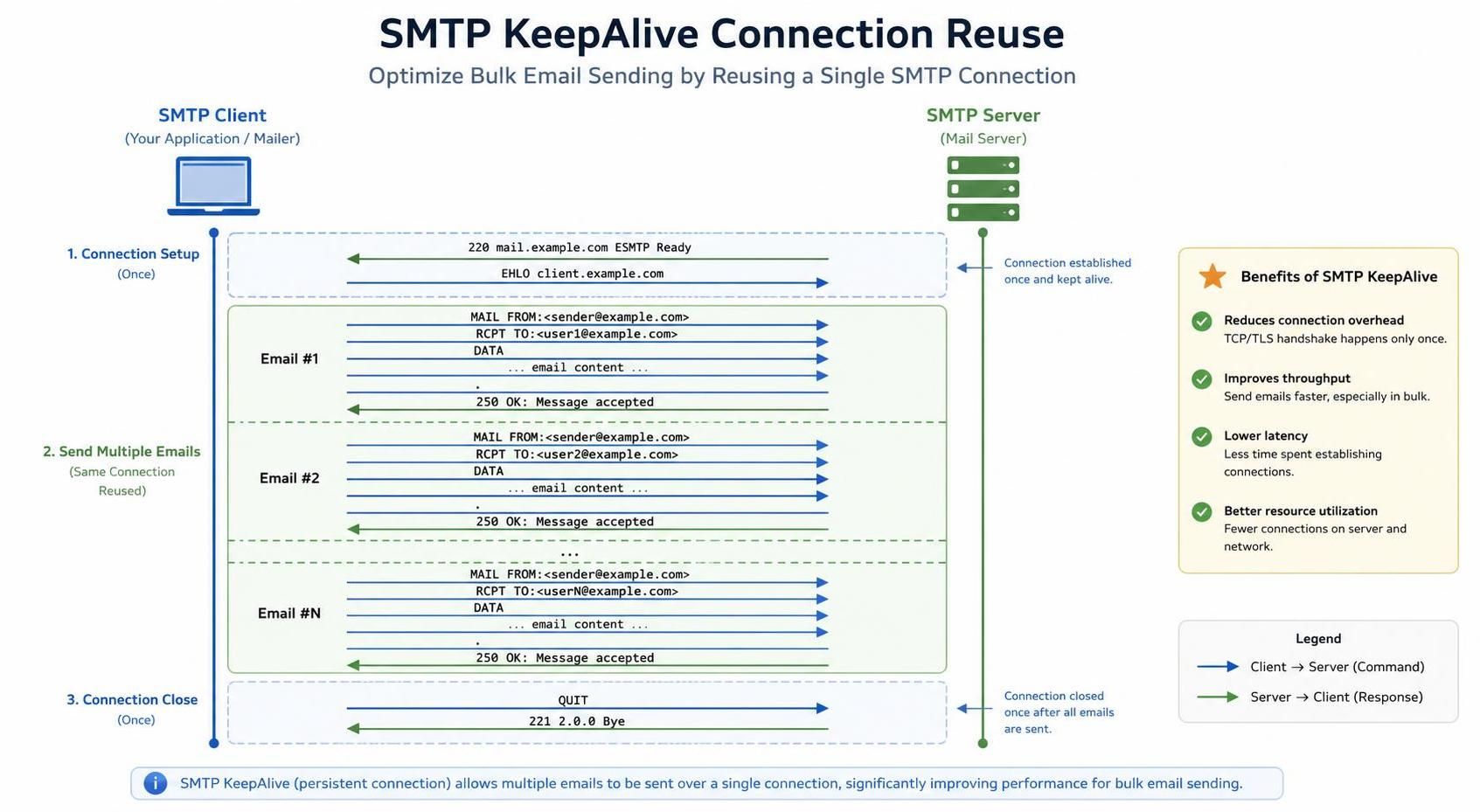
SMTPKeepAlive in PHPMailer refers to maintaining an open SMTP connection across multiple email transmissions instead of opening and closing the connection for every single message. At the protocol level, SMTPKeepAlive utilizes the persistent connection capability defined in RFC 5321, allowing subsequent mails to be sent through the same TCP session until explicitly closed. This reduces the latency and overhead caused by repeated handshakes and authentications with the SMTP server, thereby enhancing throughput and resource efficiency.
In bulk email contexts, SMTPKeepAlive is particularly valuable as it mitigates connection throttling imposed by SMTP servers. Each new connection typically undergoes a handshake sequence, including EHLO, authentication, and sender verification. By reusing a single session, these repetitive steps are bypassed for each email after the initial setup. One practical way to confirm if SMTPKeepAlive is functioning properly is by enabling PHPMailer’s debug output. By reviewing the SMTP debug logs, you can observe whether the connection persists or if a new handshake is triggered for every email sent.
To validate SMTPKeepAlive’s presence, insert a loop sending multiple emails while logging SMTP transactions. If you notice a single EHLO and authentication followed by multiple MAIL FROM and RCPT TO steps without reopening the connection, SMTPKeepAlive is active. Conversely, if each email triggers a new EHLO sequence, it indicates that SMTPKeepAlive is disabled or not working as expected.
Adapting SMTPKeepAlive settings requires careful consideration of the SMTP server’s connection timeout policies. Excessive connection persistence can trigger disconnections from sources wary of idle sessions or initiate blacklisting counters for perceived abuse. Therefore, developers often pair SMTPKeepAlive with controlled send rates through email throttling to sustain stable and efficient mass mailing.
Email Throttling with PHPMailer: Managing Rate Limits to Avoid Server Blocks
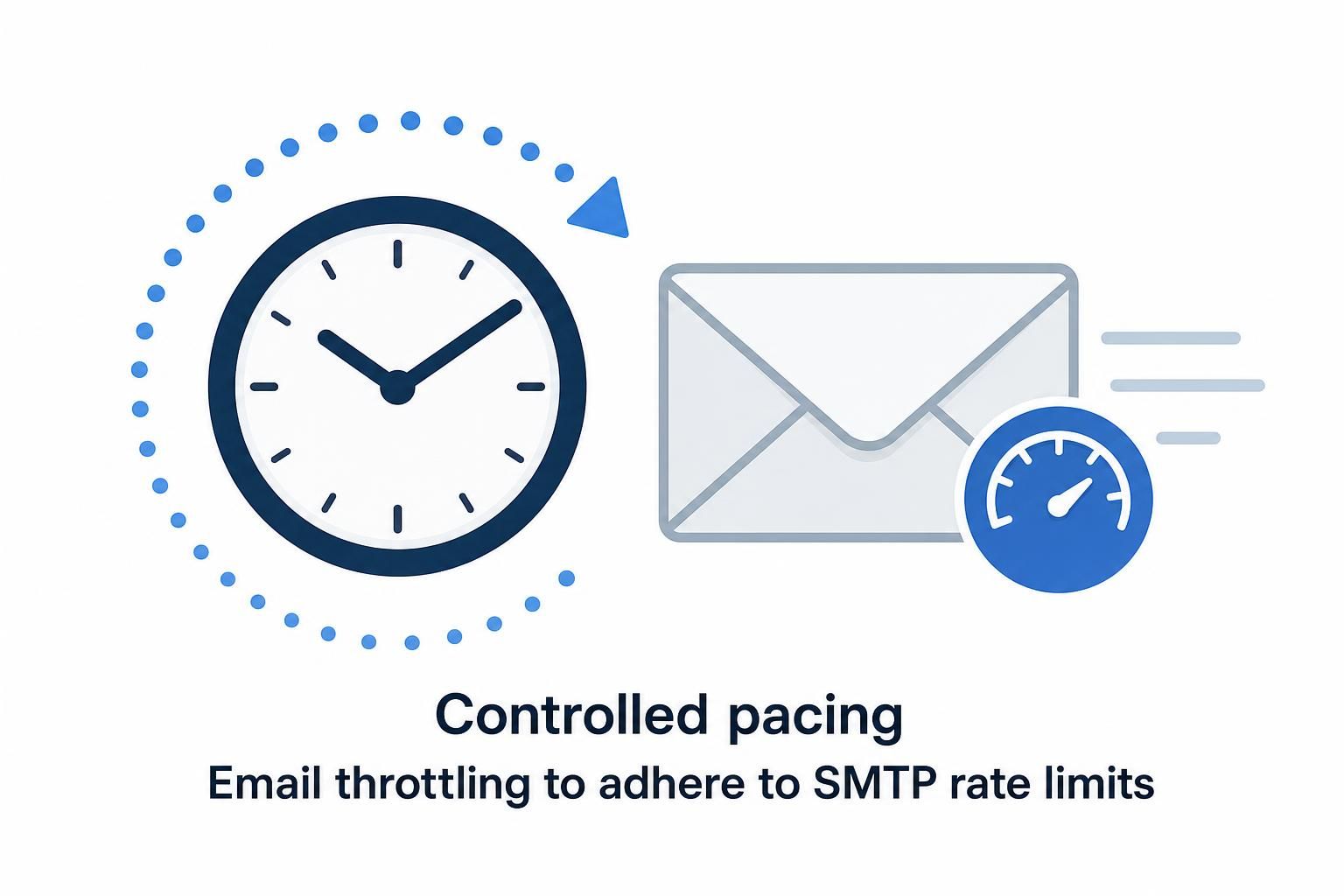
Email throttling refers to deliberately pacing the sending rate of emails to comply with SMTP server constraints or ISP policies. Many SMTP providers enforce rate limiting to prevent abuse and maintain quality of service, capping the number of messages that can be sent per minute or hour. Throttling ensures compliance by inserting pauses or spacing out the sending intervals during bulk mailings.
At the SMTP protocol level, throttling doesn’t involve any special command but is enacted client-side via timing control between successive SMTP commands and message deliveries. PHPMailer users can implement throttling by introducing delays between send calls or grouping emails into batches spaced by time intervals. This pacing strategy prevents triggering rate limit exceeded errors like “451 Too many messages sent” or “421 4.7.0 [TS01] Messages from your IP are temporarily blocked.”
Confirming throttling issues specifically involves examining SMTP error codes and server responses during the sending process. Errors with 4xx codes often hint at temporary rate limiting, while 5xx codes might indicate permanent blocks. Checking these values in PHPMailer’s SMTP debug output helps differentiate whether failures result from throttling thresholds or other causes like authentication or DNS problems.
Developers can systematically test throttling by gradually increasing sending speeds and monitoring bounce rates or SMTP response messages. Implementation of dynamic throttling algorithms, which adjust sending speed depending on real-time feedback, is a robust way to ensure mass mailings continue smoothly without server refusals. Throttling also intertwines with SMTPKeepAlive so that persistent connections do not become victims of accelerated sending bursts.
Structuring Email Queues for Reliable Bulk Mailing with PHPMailer
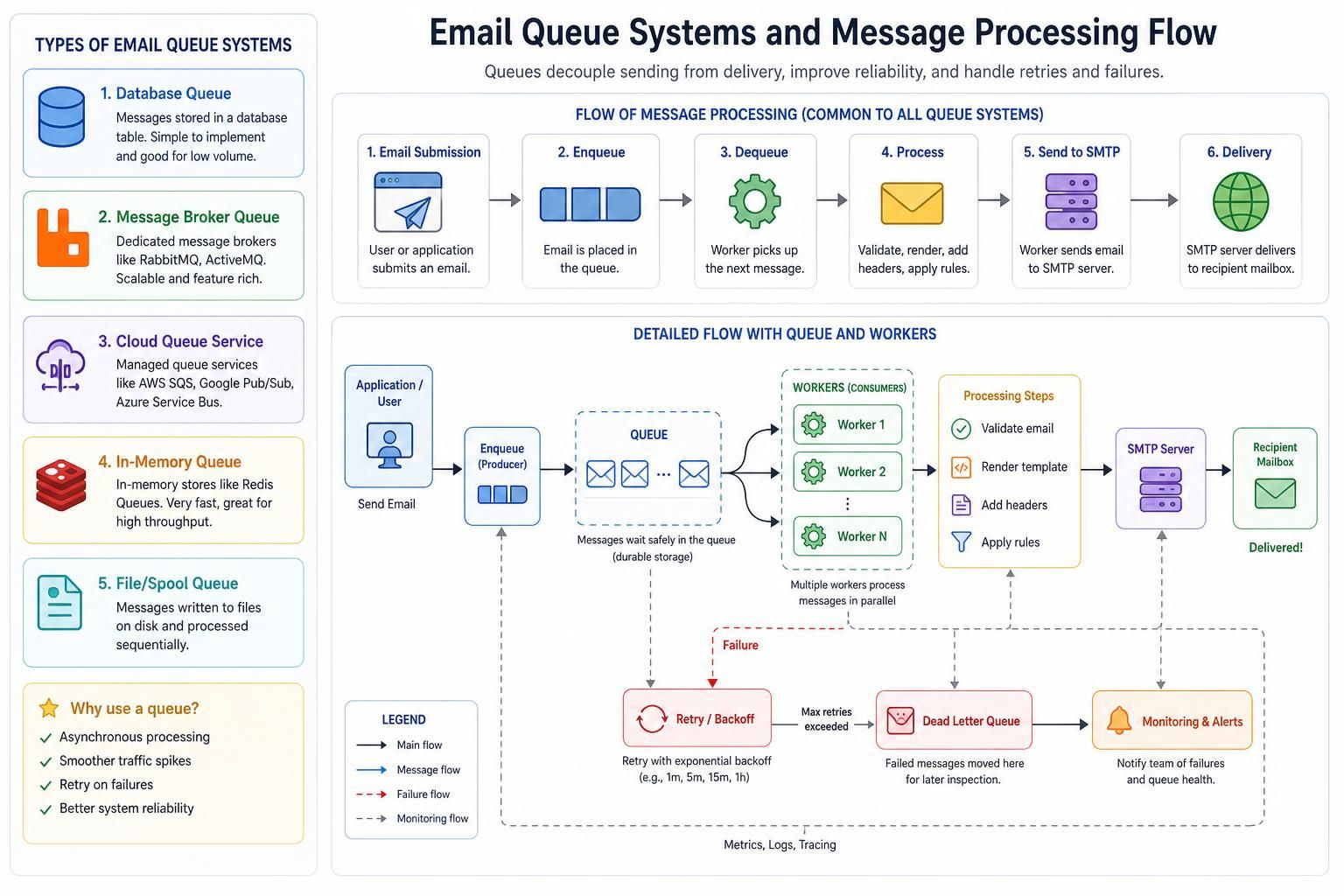
Email queues serve as buffers in the sending pipeline, staging emails before they are dispatched to the SMTP server. Queues help manage delivery loads when dealing with thousands or millions of messages, enabling retries on failures, load balancing, and asynchronous processing. Within PHPMailer-based systems, queues can be implemented via database tables, message brokers, or file-based storage, each allowing deferred processing rather than synchronous immediate sending.
At the application layer, queuing tools abstract the rate and volume control from the core SMTP transport, coordinating email jobs that can be executed by background workers or cron jobs. This separation of concerns enhances the scalability and reliability of mass mailing campaigns, especially when combined with SMTPKeepAlive to keep connections open over prolonged sending periods.
Diagnosing queue-related issues differs from SMTPKeepAlive or throttling problems. If emails stagnate without leaving queues, logs and queue statistics become vital to pinpoint bottlenecks. A typical queue testing approach involves injecting test emails into the queue and tracking their progression until sent confirmation or failure. If some emails never transition out, this implies queue worker failure or misconfiguration rather than SMTP connectivity faults.
Queue designs frequently adopt priority levels and retry schedules to optimize delivery attempts. For instance, urgent transactional emails might bypass queues or get preferential dispatch, whereas bulk newsletters are batched with retry logic on transient errors. Queues also facilitate integration with external mailing platforms or fallback delivery systems for enhanced reliability.
Common Queue Management Approaches and Technologies
| Queue Type | Storage Method | Advantages | Use Cases |
|---|---|---|---|
| Database Queue | SQL Databases | Easy to implement with existing DB infrastructure; transactional integrity | Small to medium volume bulk campaigns |
| Message Broker | RabbitMQ, Redis, Kafka | High throughput, asynchronous processing, scalable | Large enterprise-level mass mailing systems |
| File-Based Queue | Filesystem | Simple setup, minimal dependencies | Low-volume or isolated environments |
Failure Modes in PHPMailer Bulk Email Delivery: When SMTPKeepAlive and Throttling Don’t Resolve Issues
Even with correctly implemented SMTPKeepAlive and email throttling mechanisms, bulk email campaigns may encounter failure modes that require deeper troubleshooting. Common complications include transient network errors, IP blacklisting, DNS configuration issues, and authentication mismatches.
One indicator that SMTPKeepAlive isn’t the root cause is if the connection appears persistent in debug logs, yet message sending still fails. This may signal server-side SMTP greylisting, where mails are temporarily deferred regardless of connection state. Testing involves sending individual emails outside bulk scripts to verify server responses and network connectivity.
Failures related to throttling typically manifest as repeated temporary rejections or server disconnects. If increasing inter-message delays does not prevent these, the blocking may stem from recipient ISP filters or reputation-based blacklists. Confirming such issues requires external blacklist checks and consulting provider policies beyond PHPMailer’s scope.
Another failure mode arises from improper queue configurations. Emails may never leave the queue due to worker crashes, database locks, or synchronization problems. Monitoring queue health through logging and metrics dashboards is critical in real-world deployments, as queued messages hold potential to cause silent delivery breakdowns.
Developers are advised to enable verbose PHPMailer debug output (see SMTPDebug reference) when troubleshooting, as SMTP transaction traces provide invaluable insights into errors and server responses not visible at the application layer.
Videos like this demonstrate practical steps to implement SMTPKeepAlive and debug PHPMailer for bulk mailing contexts.
Best Practices for Combining SMTPKeepAlive, Throttling, and Queues in PHPMailer Bulk Email Systems
Effective bulk email delivery is a multifaceted challenge, requiring a cohesive strategy that aligns SMTP connection management, send rate control, and job scheduling. Integrating SMTPKeepAlive with measured throttling and robust queuing ensures email delivery systems can handle high-volume campaigns without performance degradation or compliance violations.
An exemplary approach involves:
- Activating SMTPKeepAlive to reduce connection overhead but limiting session durations to prevent timeout errors.
- Implementing Email Throttling dynamically based on SMTP server feedback to adapt sending speeds in real-time.
- Designing resilient Email Queues that allow retries, prioritize critical mail, and recover gracefully from interruptions.
- Monitoring system health with logs, SMTP debug prints, and queue metrics to detect anomalies early.
- Testing sending patterns regularly to optimize batch sizes, delay intervals, and concurrency thresholds based on actual mail server behavior.
Balancing these factors contributes to improved email delivery rates, minimized risk of spam classification, and more predictable operation under the constraints of increasingly stringent SMTP server policies observed in 2026. This orchestration is essential for enterprise marketers and developers relying on PHPMailer for email automation and mass mailing workflows.
How does enabling SMTPKeepAlive improve bulk email sending performance?
SMTPKeepAlive maintains a single SMTP connection open for multiple emails, reducing the overhead caused by repeatedly opening and closing connections. This increases throughput by shortening the time spent in SMTP handshakes and authentications when sending bulk emails.
What are common symptoms indicating email throttling issues when using PHPMailer?
Symptoms include receiving temporary 4xx SMTP error codes such as ‘451 Too many messages’ or ‘421 Messages temporarily blocked.’ These errors occur due to exceeding the SMTP server’s sending limits. Monitoring these codes in PHPMailer’s debug output helps identify throttling.
Why are email queues essential in large-scale mass mailing systems?
Queues help manage the load by buffering outgoing messages and allowing asynchronous processing, retries, and prioritization. They decouple message preparation from sending, leading to improved reliability and scalability in handling significant email volumes.
What should be checked if emails get stuck in the queue?
Investigate the health of queue workers, database locks, resource availability, and configuration errors. Logs and queue monitoring dashboards can reveal points where messages halted. Issues usually stem from worker crashes or misconfigured retry logic rather than SMTP connectivity.
Where can I find debugging information to resolve PHPMailer SMTP problems?
Enabling PHPMailer’s SMTP debug output is the best way to gather detailed SMTP transaction data. The official SMTPDebug reference provides guidelines on activating and interpreting these logs for troubleshooting.
