

In the digital age where email communication is paramount, encountering the challenge of PHP mail landing in spam folders is a recurring frustration for developers and marketers alike. This pervasive issue disrupts email deliverability and hinders effective communication, damaging reputation and engagement rates. PHP mail, despite its widespread use for sending automated emails within web applications, often falls into the abyss of spam filters, leaving the sender clueless about the technical breakdown leading to this failure. Understanding the intricate dance between SMTP configuration, email authentication protocols like DKIM, SPF record, and DMARC, alongside factors like blacklist listings and malformed email headers, is essential to tackle the problem head-on. This article unfolds a detailed technical checklist to decode why PHP mail frequently lands in spam and provides actionable diagnostics for each potential cause.
Key points to focus on:
- PHP mail functionality and its interaction with SMTP servers
- The role and structure of email authentication protocols (SPF, DKIM, DMARC)
- Impact of blacklist registrations on email deliverability
- Importance of well-formed email headers and compliance
- Diagnostic steps to differentiate causes of PHP mail spam filtering
Understanding “PHP mail lands in spam” at the protocol and technical level
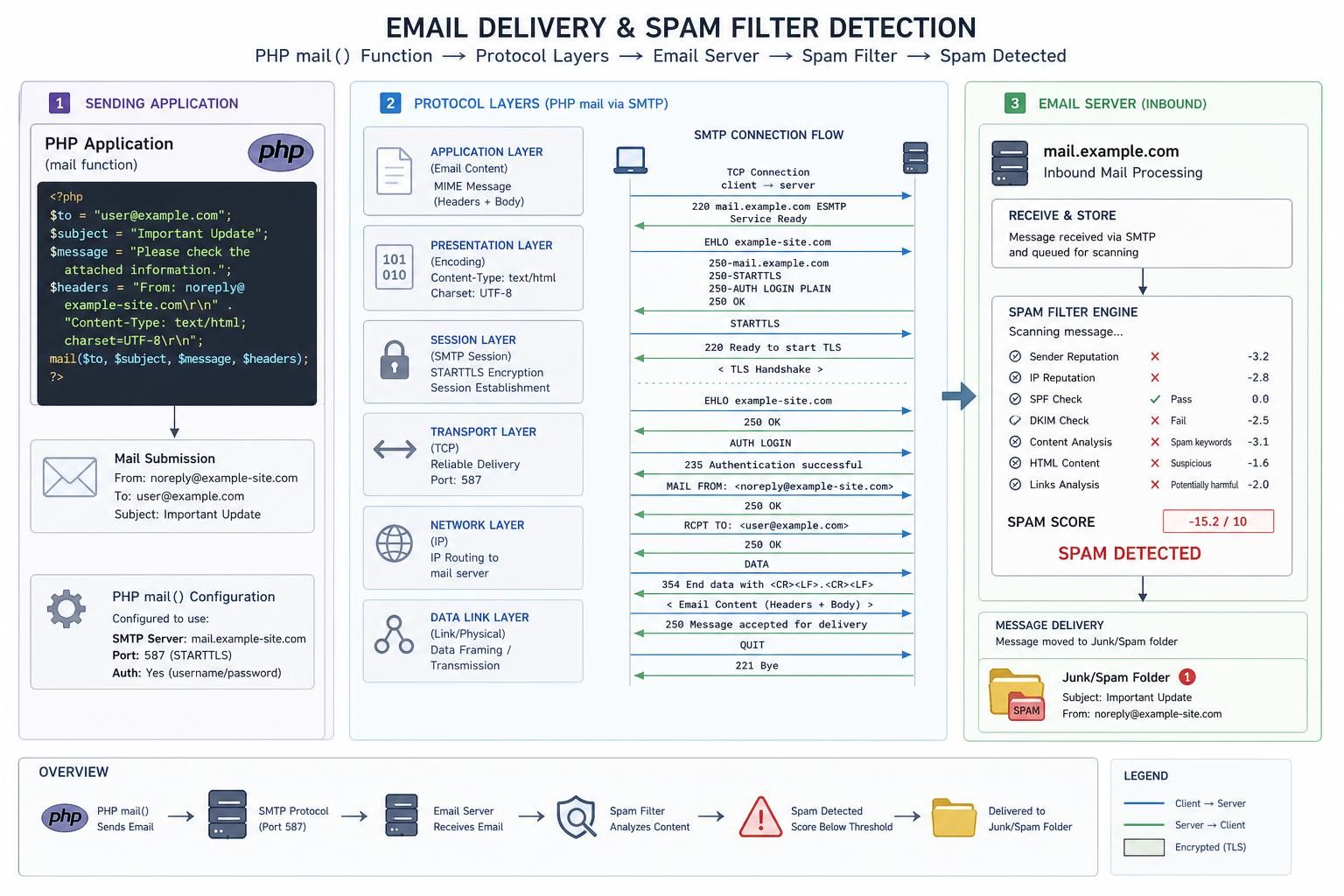
The phrase “PHP mail lands in spam” refers to the generic but frustrating scenario where emails sent via PHP’s built-in mail() function are consistently routed to recipients’ spam or junk folders rather than the inbox. At the protocol level, this means the receiving mail server’s spam filter has flagged the email based on an array of heuristics and checks, perhaps concluding the email fails authentication, appears suspicious, or exhibits characteristics of unsolicited mail.
PHP mail works as a wrapper, calling the underlying SMTP server to dispatch emails. However, unlike SMTP clients, PHP mail often provides minimal control over headers, authentication, or encryption. The absence of proper SMTP configuration or authentication can make these emails prone to be flagged by spam filters. Modern spam filters analyze the email’s path, checking for SPF compliance to verify sender IP authorization, DKIM signatures to prove content integrity, and DMARC policies to align domain policies with authentication results. Emails lacking these verifications frequently trigger spam warnings.
Malicious senders often mimic PHP mail scripts to distribute spam, leading spam filters to be extra vigilant. This skepticism is compounded when email headers are malformed, sending IPs are blacklisted, or content resembles spam patterns. Each of these technical triggers can identify PHP mail as spam at the receiving server.
The complexity lies in diagnosing the specific cause behind an email being flagged as spam because multiple factors interplay. Understanding this layered authentication ecosystem and how PHP’s mail function interacts with these protocols is the first step in repairing email deliverability for any PHP-based system.
Improper SMTP Configuration as a Leading Cause of PHP Mail Spam Filtering
One of the primary reasons PHP mail ends up in spam folders is improper SMTP configuration. Although PHP’s mail() function uses the server’s mail transfer agent, failure to configure SMTP correctly can result in emails lacking proper authentication, encryption, or correct routing information.
Incorrect SMTP settings can lead to missing or malformed email headers, especially the From, Reply-To, and Return-Path headers. These headers not only inform the recipient about the sender but are integral in spam filter checks. Without these, messages can be flagged as suspicious. many servers require authentication credentials when sending emails. Sending unauthenticated messages often triggers spam filters to mark emails as suspicious.
To diagnose if SMTP configuration is at fault, developers can send test emails using SMTP debugging tools or libraries like PHPMailer with SMTPDebug enabled. This allows visibility into the server’s response codes and authentication flows, offering clues on whether the mail server is rejecting or flagging the messages internally before reaching recipients.
Testing involves:
- Confirming SMTP host, port, username, and password correctness.
- Verifying SSL/TLS encryption is enabled as required by the mail server.
- Checking that the envelope sender matches domain policies.
If tests reveal errors or missing headers, adjustments in the PHP mail wrapper or switching to SMTP-based libraries will improve email deliverability. configuring reverse DNS (PTR) records and ensuring sending IP reputation ties into SMTP setup reliefs spam filtering pressures.
SPF Record Misconfiguration: How It Triggers Spam Filters on PHP Mails
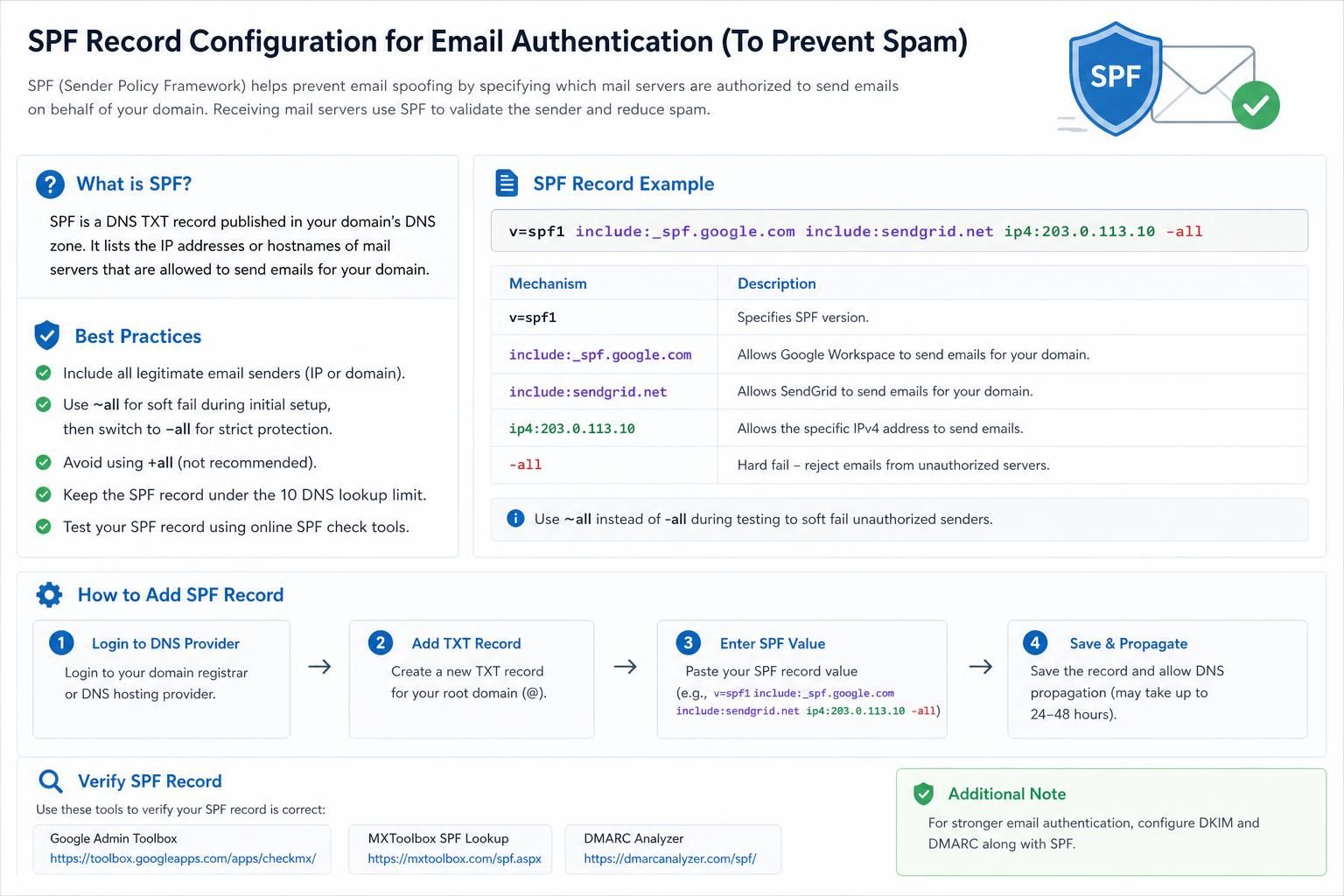
The presence and correct configuration of an SPF record (Sender Policy Framework) in DNS have become paramount in email authentication. An SPF record specifies which IP addresses or servers are permitted to send emails on behalf of your domain. When the receiving mail server queries your domain’s DNS for an SPF record and finds that the sender IP is not listed, it marks the message as unauthenticated and likely spam.
For PHP mail, if the outgoing email originates from an IP address not included in the SPF record or if the domain lacks a valid SPF setup altogether, spam filters will distrust the message. This is common in shared hosting environments where multiple domains send emails from the same IP, but the SPF records are not uniformly configured to allow this.
The precise test distinguishing SPF issues involves using tools such as MXToolbox SPF Check or command-line lookups like dig TXT yourdomain.com to review DNS entries. Sending an email to test services that report SPF authentication results is also effective.
When SPF failure is confirmed:
- Update the domain DNS SPF record to include the IP address or SMTP server used for sending via PHP mail.
- Avoid multiple SPF records, which will cause validation to fail.
- Implement a soft fail (~all) initially to monitor impact before switching to a hard fail (-all).
Failure to address SPF misconfiguration ensures messages continue landing in spam irrespective of content quality or other authentication layers.
DKIM Signature Absence or Failure: Impact on PHP Mail Spam Classification
DomainKeys Identified Mail (DKIM) provides a cryptographic signature appended to email headers, proving the message was unaltered in transit and was indeed sent from an authorized server. PHP mail by default does not sign emails with DKIM, making unsigned messages less trustworthy to spam filters.
Without DKIM, even valid emails might face scrutiny because filters commonly score high on missing signatures, especially from domains known to require them. DKIM failure or absence is detectable by analyzing the email headers received by the recipient or via tools like Gmail’s “Show Original” view.
Developers must verify presence by examining the DKIM-Signature header in outbound emails. Automated tools such as DKIM record validator or open-source libraries that integrate DKIM signing (e.g., PHPMailer with DKIM support) allow simulation and validation of signatures.
Addressing this involves:
- Publishing appropriate DKIM public keys in DNS records under the domain.
- Configuring the mail server or PHP mail wrapper to sign outgoing mails.
- Regular audits to ensure the selector and keys remain valid and uncompromised.
By integrating DKIM, PHP mail messages align with modern email authentication expectations, greatly improving email deliverability and reputation.
DMARC Policy Failures and Their Role in PHP Mail Being Marked as Spam
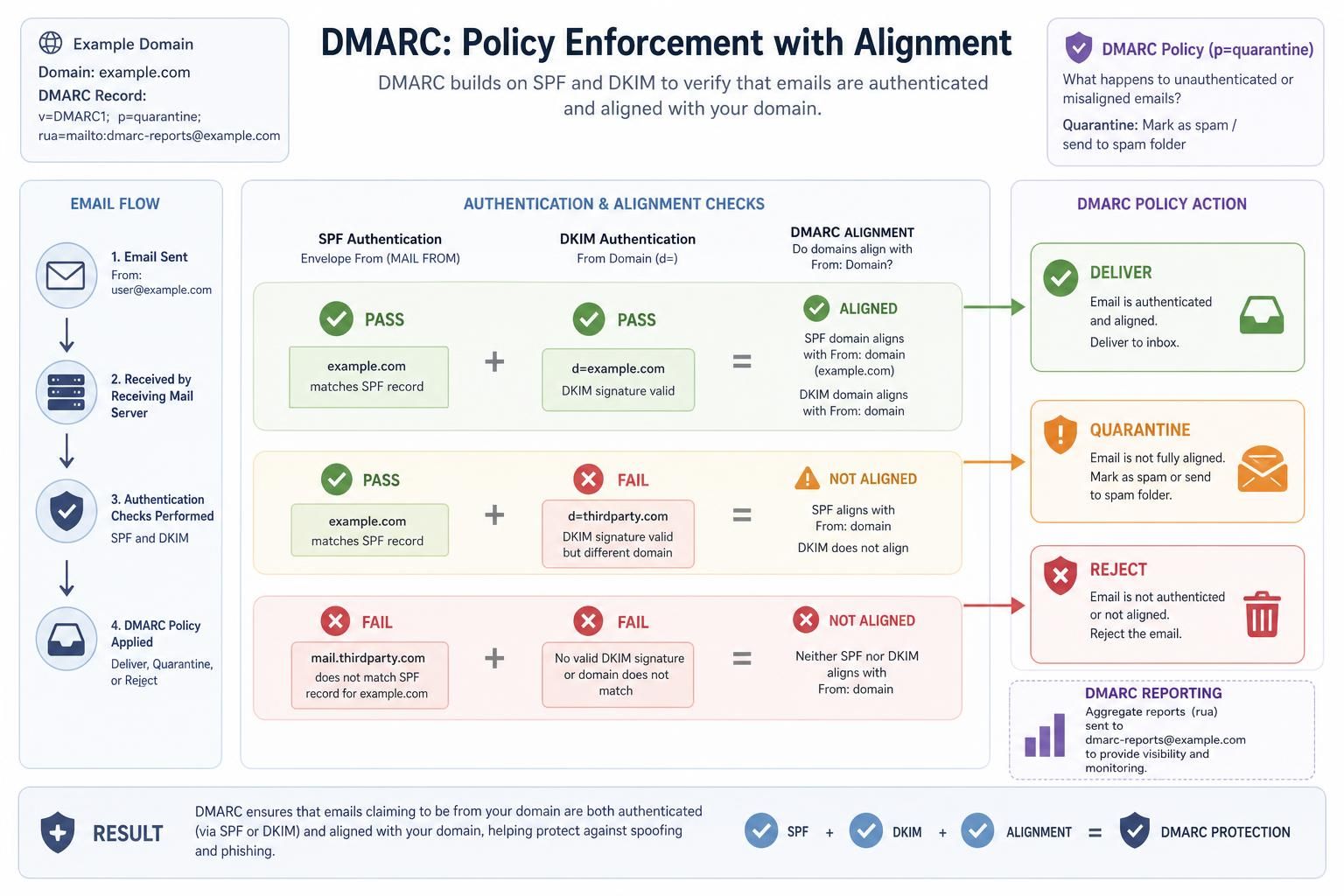
DMARC (Domain-based Message Authentication, Reporting, and Conformance) aligns SPF and DKIM by instructing receiving servers on how to handle unauthenticated mail under your domain. A strict DMARC policy combined with failing SPF or DKIM causes emails to be outright rejected or routed to spam.
PHP mail often bypasses these strict authentication layers due to its default simplicity, increasing the chance of DMARC failures. The domain owner might receive DMARC reports indicating failed alignments that correlate with PHP mail sent emails.
Testing DMARC status can be done via tools like:
The test that distinguishes DMARC failure from SPF or DKIM alone is the evaluation of alignment. Whether the domain in the From header matches the domains validated by SPF and/or DKIM.
To remediate:
- Ensure both SPF and DKIM are correctly configured and aligned.
- Adjust DMARC policy gradually (none → quarantine → reject) based on monitoring.
- Use aggregate DMARC reports to identify and fix sending sources causing failure.
Without DMARC alignment, even authenticated emails may be relegated to spam, particularly when domain-based reputations are strict.
Blacklists and Their Influence on PHP Mail Delivery and Spam Filtering
Blacklists are curated databases identifying IP addresses or domains known to send spam. If your server’s IP address used by PHP mail is listed on a blacklist, receiving servers will treat the email as potentially harmful and mark it as spam or block it outright.
Blacklisting can occur due to previous abuse, insecure server configurations, or spamming behavior unintentionally caused by misconfigured PHP mail scripts. This is often difficult to detect without targeted tests.
Tests to confirm blacklisting include checking your sending IP against common blacklist databases using online tools like:
Once confirmed, delisting steps must be initiated through blacklist operators. Meanwhile, consider changing or upgrading your sending IP or moving to reputable SMTP providers to mitigate the impact.
Proactive measures include:
- Monitoring server logs for unusual sending patterns.
- Implementing rate limiting and spam detection in your PHP mail logic.
- Maintaining updated server security and credentials.
Blacklist presence overwhelmingly impacts email deliverability and often requires persistent remediation beyond simple PHP mail fixes.
Malformed or missing email headers can instantly trigger spam filters on receiving servers. PHP mail does not inherently generate sophisticated headers, often leading to incomplete ‘From’, ‘Reply-To’, ‘MIME-Version’, or ‘Content-Type’ headers, which are red flags for spam filters. Testing header integrity involves inspecting raw email data received or utilizing tools that analyze email headers for compliance. Headers must conform to RFC standards to be considered legitimate. Common symptoms include: Rectifying header issues can be achieved by: Proper headers not only reduce suspicion but also facilitate forward compliance with email authentication mechanisms.Malformed Email Headers and Their Role in PHP Mail Spam Flagging
Return-Path or Message-ID.Date header or absent Content-Type.
Header Field
Purpose
Impact if Missing or Malformed
From
Identifies sender’s email address
Recipient distrust, spam filtering
Return-Path
Bounce handling and SPF verification
SPF failures, bounced mail issues
DKIM-Signature
Email authentication integrity
Authentication failure, spam suspicion
Message-ID
Unique message identification
Spam filters may flag as suspicious
Content-Type
Specifies email content format
Incorrect display or spam filters trigger
