

Rolling out DMARC without breaking your mail is one of the most critical yet challenging tasks in enterprise email security. As companies strive to protect their domains from phishing and spoofing, transitioning from a monitoring-only DMARC policy (p=none) to full enforcement (p=reject) requires strategic planning. This shift involves not only technical adjustments to SPF and DKIM configurations but also meticulous analysis of third-party senders and comprehensive monitoring to ensure seamless email deliverability.
Many organizations stall at p=none, mistaking it as sufficient protection against spoofing, while others leap prematurely to p=reject, inadvertently disrupting legitimate communications. The balance lies in a staged enforcement approach, leveraging detailed aggregate reporting to inventory legitimate senders, identify misalignments, and resolve issues before tightening policies.
Understanding DMARC’s role as an authentication mechanism that ties together SPF and DKIM with domain alignment is essential. This alignment dictates whether a received message truly represents the sending domain, helping to reduce phishing threats effectively. Proper rollout avoids common pitfalls such as breaking marketing emails, neglecting subdomain policies, or ignoring the complexity introduced by forwarding chains. In this guide, practical steps and real-world examples illustrate how organizations can confidently advance DMARC policies without sacrificing email functionality or business operations.
In brief:
- DMARC p=none is monitoring only and does not prevent spoofing.
- Successful rollout demands thorough third-party sender inventory and aggregate report analysis.
- Staged policy enforcement using pct= tags reduces risk by gradually quarantining and then rejecting failing emails.
- SPF and DKIM alignment underpins DMARC; each has unique strengths and challenges affecting deliverability.
- Subdomain policies (sp=) and forwarding scenarios must be handled cautiously to avoid email breakage.
- ARC protocol plays an important role in preserving delivery through forwarding chains at enforcement levels.
- Completing the rollout prevents phishing, strengthens domain protection, and enhances overall email security posture.
What Does Rolling Out DMARC from p=none to p=reject Really Mean at the Protocol Level?
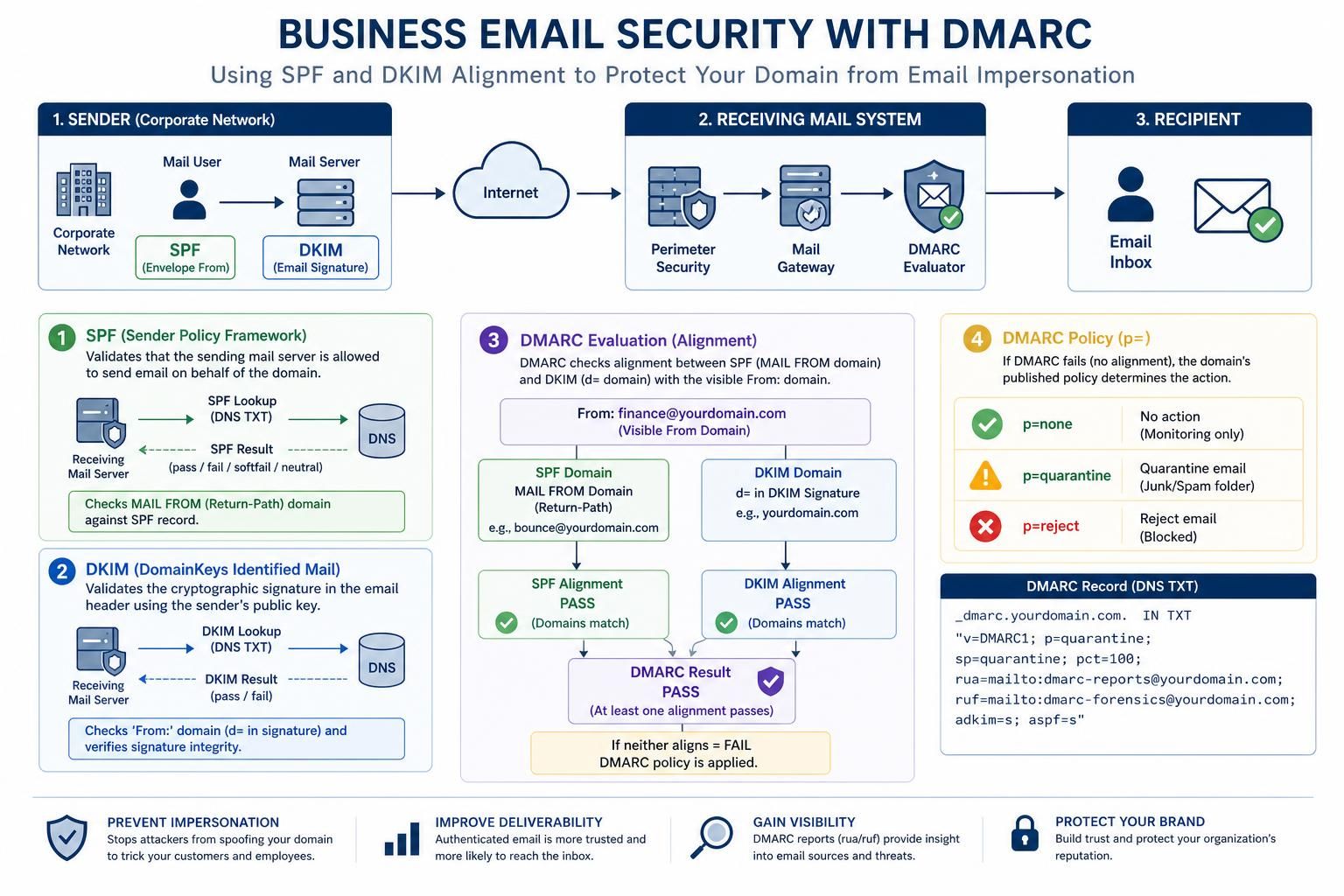
Rolling out DMARC from p=none to p=reject means progressing your domain’s email authentication enforcement from a monitoring-only state—where failing emails are reported but not blocked—to a strict rejection mode that instructs receiving servers to discard messages failing DMARC checks. At the protocol level, this revolves around how the Domain-based Message Authentication, Reporting & Conformance (DMARC) standard interfaces with the underlying SPF (Sender Policy Framework) and DKIM (DomainKeys Identified Mail) authentication mechanisms.
DMARC’s primary function is to verify that a message’s envelope sender (used in SPF checks) or its DKIM signing domain aligns with the domain shown in the user’s visible From header. This alignment ensures that an attacker cannot simply pass SPF or DKIM checks with a different domain while spoofing the From address.
Moving from p=none to p=reject means that instead of merely reporting DMARC failures back to the domain owner via aggregate reports (rua) and forensic reports (ruf), the receiving mail servers enforce the policy by quarantining or rejecting emails based on the DMARC fail status. This escalation drastically reduces phishing and spoofing opportunities but cannot be achieved safely without prior meticulous analysis and remediation of all legitimate email streams.
The DMARC record syntax allows for toggling enforcement via the p tag, while the pct= tag lets administrators phase their enforcement gradually. Only applying the policy to a percentage of incoming mail. This feature is critical during the transition phase to avoid immediate and total mail disruption.
Key points to understand at the protocol level include:
- Alignment—The foundational concept requiring the SPF domain (MAIL FROM) or DKIM domain (d=) to “align” with the From header domain.
- Reporting—Aggregate (rua) and failure (ruf) reports sent to the domain owner that provide visibility into legitimate and malicious sources.
- Enforcement—Instructions to receiving servers about how to handle failed authentication at varying policy levels (
none,quarantine, andreject).
The ultimate goal is to prevent unauthorized senders—phishers and spammers—from impersonating the domain while allowing legitimate mail through unimpeded.
Misconfigured Third-Party Sender Settings: How to Detect and Fix Alignment Failures
A common cause of email failures when transitioning to p=reject is misalignment caused by third-party senders, such as marketing platforms, ticketing systems, or billing services, that send mail “as your domain” but are not fully configured to align SPF or DKIM properly.
Identifying and confirming this cause requires detailed inspection of your DMARC aggregate reports, which reveal sources failing alignment despite being legitimate senders. Tools like SMTPDebug output can help diagnose how incoming messages are authenticated, showing SPF and DKIM pass/fail statuses and alignment details.
The test that distinguishes misconfigured third-party senders from other causes is:
- Examine headers of failing messages to determine which authentication mechanism failed alignment (SPF or DKIM).
- Check the
Return-Pathdomain for SPF alignment and theDKIM-Signaturedomain for DKIM. - Correlate with DMARC aggregate report entries to identify persistent failing senders.
Once identified, actions to fix alignment include:
- Request or enable DKIM signing by the third-party sender with your domain to ensure d= alignment.
- Update your SPF record to include the third-party’s sending IPs or use a dedicated subdomain for that sender group, delegating SPF and DKIM configuration there.
- Coordinate with the third-party platform to set up proper SPF return-path and DKIM selectors.
For example, a marketing platform sending newsletters may fail DKIM alignment because it signs with its own domain. Creating a subdomain like marketing.example.com and analyzing its separate DMARC reports before enforcing policies there can prevent broken mail flows.
This step is pivotal because many DMARC rollout failures in 2026 result from skipping comprehensive third-party sender inventory and remediation.

Subdomain Policy and Forwarding Issues: Verifying Proper DMARC Sp= Settings
Another distinct cause of mail failure during DMARC enforcement is improper subdomain policy (sp=) configurations combined with forwarding complexities. Many organizations overlook subdomains when transitioning to p=reject and inadvertently break legacy or lesser-known senders operating under these subdomains.
The test to distinguish this cause involves:
- Reviewing DNS records for
_dmarc.subdomain.example.comentries compared to the main domain’s DMARC policy. - Checking DMARC reports for subdomain-specific failures. In particular, identifying legacy systems or marketing platforms sending as subdomains.
- Monitoring emails from subdomains for sudden drops or delivery to spam following subdomain policy changes.
The key to resolving this cause includes:
- Maintaining
sp=nonein the DMARC record during initial rollout phases until you confirm subdomain senders and their authentication are stable. - Publishing explicit DMARC records per subdomain that is a legitimate sender, with tailored policies (quarantine or reject) after inventory and alignment correction.
- Isolating high-volume or third-party senders to dedicated subdomains and configuring SPF and DKIM separately to avoid impacting the main corporate domain.
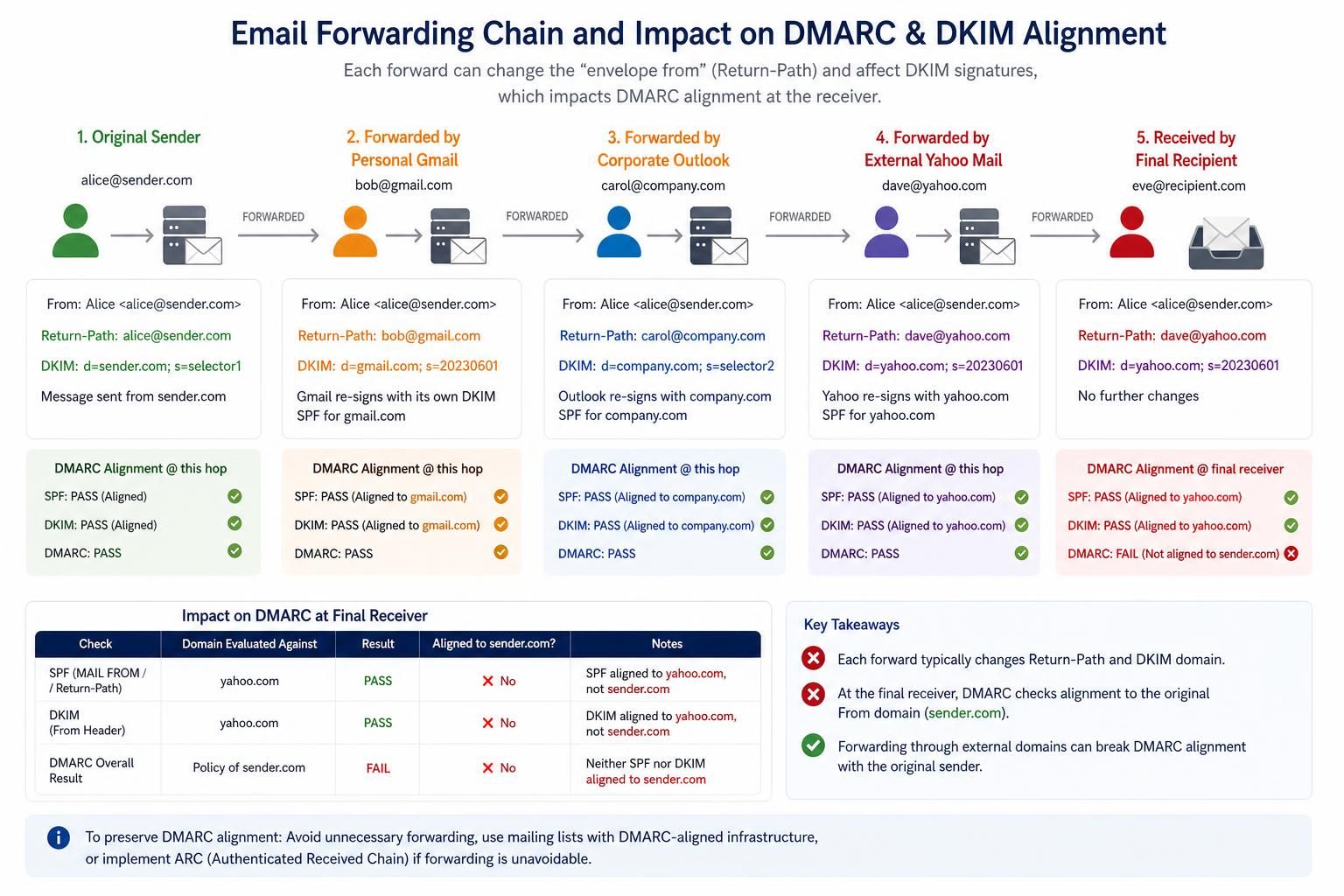
- Considering the impact of forwarding, which may break SPF but can be mitigated by ensuring DKIM alignment or implementing ARC (Authenticated Received Chain).
Forwarding chains can break SPF due to the forwarding server’s IP not matching the original SPF record. DKIM, if unbroken, offers a fallback. When both SPF and DKIM fail, enforcement policies at p=reject can cause message rejection and lost emails. Implementing ARC allows trusted intermediaries to vouch for prior authentication, preserving message delivery through complex forwarding.
Companies moving their DMARC deployment forward in 2026 often find that cautious subdomain policy management and forwarding compatibility are essential steps preventing unintended mail loss.
Why Skipping the Aggregate Report Analysis Phase Causes DMARC Enforcement Failures
Many organizations fail in the transition from p=none to p=reject primarily because they skip the crucial aggregate report analysis phase. These reports provide detailed insights about all sources sending mail from your domain, whether legitimate or spoofing attempts.
The test that identifies this specific failure mode is straightforward:
- Check if your DMARC aggregate (rua) mailbox has been consistently receiving and being reviewed for at least 4 to 8 weeks before moving policy enforcement.
- Analyze the reports for unauthorized senders as well as legitimate senders whose mail fails alignment.
- Confirm that all issues flagged have been addressed before increasing enforcement levels.
Failing to analyze and act upon aggregate data results in:
- Unintentional blocking or quarantining of legitimate emails.
- Missed spoofing attempts that continue unchecked under a misconfigured policy.
- Delayed deployments and frustrated stakeholders due to repeated incidents.
An organization that sets p=reject without analyzing aggregate reports is essentially flying blind. The result is broken communications and lost business, particularly during critical marketing campaigns, support ticketing, or financial invoicing.
This phase of data-driven iterative improvement often takes 4 to 8 weeks but is the foundation for a successful DMARC rollout without breaking email deliverability.
Failure Modes When DMARC Deployment Does Not Work As Expected and Recommendations
Even with methodical rollout plans, some failure modes can occur that prevent a smooth transition from p=none to p=reject. Recognizing these modes is essential to troubleshooting and remediation:
| Failure Mode | Cause | How to Confirm | Recommended Fix |
|---|---|---|---|
| Marketing Email Vanishes at p=quarantine or p=reject | Third-party marketing platforms failing DKIM/SPF alignment or Return-Path mismatch. | Inspect message headers for SPF, DKIM results; check DMARC failure reports; review third-party sender configuration. | Configure DKIM signing from your domain; shift marketing mail to a dedicated subdomain with its own SPF/DKIM/DMARC. |
| Legacy Subdomains Break with p=reject | Subdomains without explicit DMARC records are subject to the parent domain policy unexpectedly. | Check DNS for _dmarc subdomain records; verify subdomain mail flows with alignment checks. | Inventory subdomain senders; create explicit DMARC records per subdomain; adjust sp= tag cautiously. |
| Forwarding Breaks Deliverability | SPF fails due to forwarding IP mismatch; DKIM breakage from content modifications; no ARC support. | Analyze failure patterns in aggregate reports and forwarded mail headers. | Favor DKIM; ensure forwarding services support ARC; educate users on forwarding impact. |
| SPF PermError Due to Lookup Limit | Too many SPF includes exceed DNS lookup limit of 10. | Use SPF analysis tools (MXToolbox, dmarcian SPF surveyor) to count DNS lookups. | Flatten SPF records; use managed SPF services; limit number of includes. |
| Overlooking Third-Party Senders | Incomplete inventory leads to unknown legitimate senders failing DMARC. | Cross-validate inventory with aggregate reports; investigate unexplained senders. | Complete thorough sender inventory; enable DKIM; delegate to subdomains where feasible. |
Patience and rigorous validation during rollout phases are key. No instant “switch” exists; instead, DMARC enforcement is a dial turned gradually with protective checkpoints to prevent email disruptions.
List of critical rollout steps for DMARC from p=none to p=reject:
- Publish DMARC at p=none with aggregate reporting enabled.
- Collect and analyze aggregate reports for 4 to 8 weeks.
- Inventory and remediate all legitimate senders failing alignment.
- Stage enforcement to p=quarantine with pct=10, gradually increasing to 100.
- Monitor impact; fix issues promptly throughout quarantine phase.
- Once stable, move to p=reject with gradual pct increases.
- Maintain explicit subdomain policies and coordinate third-party sender management.
- Implement ARC to handle complex forwarding scenarios.
What happens if I keep DMARC at p=none indefinitely?
Maintaining DMARC at p=none only provides reporting without any protection. Spoofed emails continue to reach recipients, leaving your domain vulnerable to phishing.
How do I identify all legitimate third-party senders for DMARC?
Combine reviewing 30-60 days of DMARC aggregate reports with a cross-team inventory of all SaaS platforms and internal applications that send mail, then reconcile both lists to ensure full coverage.
Why do SPF PermErrors occur and how can I fix them?
SPF PermErrors happen when your SPF record triggers more than 10 DNS lookups during evaluation. Fixes include flattening the SPF record or using managed SPF flattening services to stay within the lookup limit.
What role does ARC play in DMARC enforcement?
Authenticated Received Chain (ARC) allows trusted forwarding servers to preserve original DMARC authentication results, ensuring forwarded emails do not get rejected unintentionally at p=reject.
When should I move from p=quarantine to p=reject?
Only after monitoring p=quarantine at 100% for at least 30 days without legitimate mail being quarantined should you advance to p=reject, ensuring that all alignment issues have been resolved.
