

PHPMailer is a widely used PHP library for sending emails securely and efficiently through SMTP servers. However, users often encounter the frustrating “SMTP Error: Could not authenticate” message, a common hurdle that halts email transmissions abruptly. This error signifies a failure during the authentication phase with the SMTP server despite a successful connection attempt. Understanding the exact implications of this message and the array of underlying causes is pivotal for any developer or system administrator navigating email configuration in 2026.
At its core, this error means that the SMTP server refused the login credentials supplied by PHPMailer. This is distinct from connection issues where the client cannot reach the server; here, the server is reachable but denies access based on authentication failure. Causes range widely, from incorrect credentials and misconfiguration of encryption protocols to updates in SMTP server policies and account restrictions. With the rising complexity of email security over recent years, notably advanced authentication protocols and stricter validation mechanisms, troubleshooting these issues has become both crucial and intricate.
Efficient resolution of this issue demands a systematic diagnosis to pinpoint the root cause among the many options. This article thoroughly dissects every known cause of the PHPMailer authentication error, detailing how to confirm each specific problem and how to apply an appropriate fix. Practical examples, testing methods including PHPMailer’s debug mode, and a clear differentiation between similar-faced causes make this guide a definitive resource. By mastering these techniques, users can reliably overcome the email sending error and ensure secure, uninterrupted SMTP email delivery from their PHP applications.
In brief:
- “SMTP Error: Could not authenticate” signals a login failure with the SMTP server despite a reachable connection.
- The issue usually roots in incorrect SMTP credentials, mismatched encryption settings, or updated server authentication requirements.
- Runs of PHPMailer’s SMTP debugging tool provide critical insights to differentiate causes effectively.
- Confirm specific causes by isolated tests such as telnet connectivity, credential verification, and disabling competing authentication protocols.
- Persistent errors despite correct setup often point to account restrictions, server policy changes, or security enhancements like two-factor authentication.
Understanding the PHPMailer “Could not authenticate” Error at Protocol Level
The PHPMailer “Could not authenticate” error occurs because, during the SMTP handshake, the server receives and rejects authentication credentials sent by the client. At the SMTP protocol level, authentication is required to log in before the client can send mail. This error is triggered when the SMTP server’s AUTH command fails, indicating the username or password the client presented is invalid or not accepted based on server-side policies.
SMTP authentication typically leverages mechanisms such as LOGIN, PLAIN, CRAM-MD5, or XOAUTH2, depending on the server configuration. If the authentication step fails, the server responds with a 535 error code, which PHPMailer translates into the “Could not authenticate” message. Unlike connection errors (e.g., unable to reach port 587), authentication failure means transport-level communication is fine, but user validation parameters are incorrect or insufficient.
This distinction carries diagnostic weight. For instance, if the error were a connection timeout, investigation would focus on network routing or firewall rules. However, authentication failures direct attention to credentials, encryption compliance, and SMTP server policy enforcement. In practice, PHPMailer typically reports this error when the SMTP server says “535 Authentication failed” or a similar message in its response.
Since authentication mechanisms can vary and servers may impose additional layers such as OAuth tokens or application-specific passwords, understanding which method the server expects is essential. PHPMailer’s ability to switch between several authentication schemes helps, but only if credentials and configuration reflect the server’s current requirements. With tightening security by major email providers in recent years, mismatches here have become more frequent.
Testing SMTP authentication can also utilize external tools like telnet or dedicated SMTP clients, which can verify whether the server accepts the current credentials independently of PHPMailer. enabling PHPMailer’s SMTPDebug setting illuminates the exact server messages exchanged during authentication, providing clear clues for resolving the root cause.

Incorrect SMTP Credentials: Verifying Username and Password for PHPMailer Fix
One of the most straightforward yet common causes of the PHPMailer authentication error is incorrect SMTP credentials. The SMTP server rejects authentication if the username (usually the full email address) or password supplied in PHPMailer’s configuration do not match the account on the server. This cause is often overlooked but is the fastest to confirm and fix.
To confirm that credentials are the culprit, test the same username and password through a direct client login outside PHPMailer. For example, logging into the webmail interface of the SMTP service or using a dedicated email client like Outlook or Thunderbird with identical settings can quickly reveal if the credentials are valid. If the login fails there, the problem is almost certainly with the credentials or account status.
Another effective way to isolate this cause is using PHPMailer’s debug mode:
$mail->SMTPDebug = 2;
This configuration outputs the SMTP transaction details, including the server’s response to the AUTH command. A typical server rejection message will mention “535 Authentication failed” or “Invalid credentials,” confirming the credential mismatch.
A common scenario in 2026 involves accounts where passwords have recently changed but the PHPMailer script still holds the old password. Another frequent oversight occurs with password reset workflows or temporary password setups that are not propagated to the email-sending script. Multi-account environments add complexity if the wrong account is configured inadvertently.
To fix this:
- Double-check the exact username and password, including case sensitivity and any special characters.
- Ensure that no invisible whitespace or encoding issues corrupt the credentials stored in the PHPMailer configuration file.
- Attempt a manual login with the same credentials on the SMTP provider’s website or mail client.
- Update PHPMailer’s
$mail->Usernameand$mail->Passwordproperties if necessary.
By thoroughly verifying and syncing credentials between PHPMailer and the SMTP server, the majority of authentication failures can be resolved efficiently without further troubleshooting.
Mismatched SMTP Settings: Confirming Host, Port, and Encryption Parameters
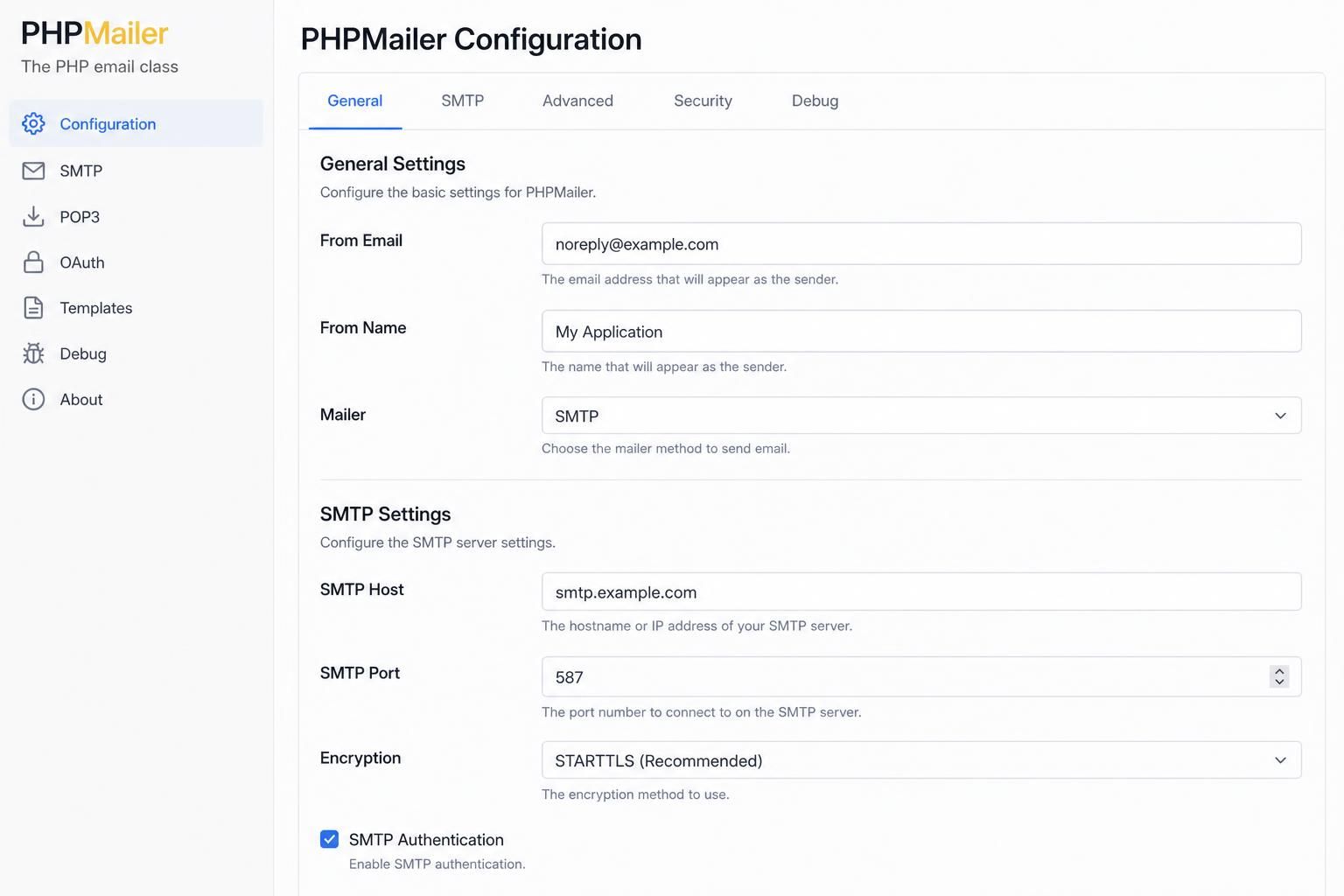
When SMTP credentials are accurate yet the email authentication failed error persists, the next area to scrutinize is the server connection settings configured in PHPMailer. These include the SMTP host, port, and encryption method. Modern SMTP servers enforce authentication over specific ports paired with proper encryption protocols for secure communication.
Incorrect or suboptimal values may cause PHPMailer to fail authenticating, even with valid credentials. For instance, Gmail’s SMTP server uses host “smtp.gmail.com” with port 587 and TLS encryption. Using an unsupported port (such as 25 without encryption) or mismatching encryption types (e.g., SSL over port 587) can cause authentication rejection.
To confirm these settings:
- Consult the SMTP provider’s official documentation for the correct host, port, and encryption parameters.
- Use command-line tools (such as telnet smtp_host smtp_port) to verify connection reachability on the specified host and port.
- Test alternate ports recommended by the provider, for example, switching between 465 (SSL) and 587 (TLS) where applicable.
- Enable PHPMailer’s debug output to observe if authentication commands are sent on the correct channel and protocol.
A sample PHPMailer configuration aligning with typical Gmail setup might look like this:
$mail->isSMTP();
$mail->Host = 'smtp.gmail.com';
$mail->Port = 587;
$mail->SMTPSecure = 'tls';
$mail->SMTPAuth = true;
$mail->Username = 'your-email@gmail.com';
$mail->Password = 'your-password';
Small misalignments such as using “ssl” instead of “tls” or assigning numeric values as strings can cause subtle issues. some hosting environments restrict outbound SMTP ports, further complicating configuration. Network-level firewalls must also permit outbound connections on the chosen port for PHPMailer to authenticate properly.
Resolving mismatched SMTP settings leads to restored communication channels and proper recognition by the server of the AUTH command, often eliminating authentication errors once credentials are verified.
SMTP Server Side Policies and Account Restrictions Causing PHPMailer Authentication Error
Even with correct credentials and perfect SMTP settings, the PHPMailer authentication error may remain if the SMTP server enforces stringent security policies or if the email account itself is impaired. Popular email providers have progressively tightened authentication requirements, especially around 2026, reflecting heightened cybersecurity risks.
Common server-side causes include:
- Account locked or suspended: Repeated failed login attempts or policy violations can lead to temporary or permanent account lockout.
- Password expiration or compulsory reset: Some SMTP providers mandate periodic password changes; outdated passwords are rejected.
- Two-factor authentication (2FA): Providers implement 2FA which disables simple password-based logins, requiring application-specific passwords or OAuth tokens.
- App password requirements: Accounts with 2FA often require generating and using app-specific passwords rather than the primary email password.
- IP restrictions and geolocation blocks: Certain services block SMTP authentication from unfamiliar IP addresses or regions.
- Disabled less secure app access: Some providers disable legacy authentication methods by default, blocking plain username-password logins from outdated clients.
To confirm server-side restrictions:
- Attempt login via the provider’s web interface to check account status and alerts.
- Review security settings at the email provider’s dashboard for enabled 2FA, app passwords, or IP blocklists.
- Check provider communications for notices regarding authentication changes or security events.
- Temporarily disable 2FA or configure app passwords to match PHPMailer’s authentication method.
Understanding these policies is vital. For example, Gmail now strongly enforces OAuth2 or app passwords for SMTP authentication, meaning direct password authentication often fails unless app-specific secrets are used. Failing to adjust PHPMailer’s configuration accordingly results in persistent email sending errors.
Cases involving account lockouts or security locks require corrective action from the provider site, such as unlocking accounts or resetting credentials. Network IP-based restrictions can be diagnosed by testing authentication from different IPs or VPN locations.
When the Standard PHPMailer Fix Does Not Work: Uncommon Causes and Failure Modes
If all typical causes have been ruled out—correct SMTP credentials, appropriate encryption settings, and verified account status—but the Could not authenticate error persists, it indicates rarer underlying issues or failure modes involved in the SMTP authentication process.
Some uncommon failure modes include:
- Server-side authentication modules malfunctioning: SMTP servers may have configuration bugs or temporary outages causing deceptive authentication failures.
- Conflict with competing authentication mechanisms: For example, if the PHPMailer configuration does not match the preferred server authentication method such as CRAM-MD5, authentication fails silently.
- SSL/TLS certificate validation issues: Invalid or expired certificates can cause connection to succeed but authentication commands to be rejected.
- Corrupted or outdated PHPMailer library files: Legacy or improperly updated PHPMailer versions may fail to negotiate authentication properly with newer SMTP server configurations.
- Hosting provider restrictions on outbound SMTP or port filtering: Some shared hosting environments block or limit SMTP sessions to external servers, leading to authentication rejections that appear as credential errors.
Diagnosing these requires deeper investigation often including reviewing SMTP server logs (where accessible), updating PHPMailer to its latest stable release, and external network testing. It may also necessitate liaising with the SMTP provider’s support team for detailed diagnostics or temporarily switching to a different SMTP relay service like Amazon SES or SendGrid.
| Failure Mode | Description | Resolution Tip |
|---|---|---|
| Server Module Glitches | SMTP server software errors causing false auth failures | Contact provider support; retry after some time |
| Authentication Mechanism Conflict | Misalignment between PHPMailer auth method and server | Configure PHPMailer to use appropriate method (e.g., CRAM-MD5) |
| SSL/TLS Certificate Issues | Rejected due to invalid or expired certs | Update or bypass certificate validation cautiously |
| Outdated PHPMailer Version | Incompatible with modern SMTP auth standards | Upgrade PHPMailer to latest stable release |
| Hosting Provider Restrictions | Outbound SMTP ports blocked or filtered | Verify with host; use alternative ports or relays |
In complex deployments, systematic elimination of each failure mode through targeted testing and debugging—leveraging tools like PHPMailer’s SMTPDebug—is the key to success in resolving the “Could not authenticate” puzzle.

Why does PHPMailer say ‘Could not authenticate’ even with the correct password?
This can happen if SMTP settings such as port, encryption, or authentication method differ from what the server requires, or if modern security measures like two-factor authentication demand app-specific passwords.
How can I enable detailed debugging output in PHPMailer?
Set the SMTPDebug property to 2 or 3 in your PHPMailer code like this: $mail->SMTPDebug = 2; This will show detailed client-server communication to help identify authentication failures.
Can disabling two-factor authentication fix SMTP authentication issues?
Disabling 2FA can allow traditional password-based login but is not recommended. Instead, generate an app-specific password or use OAuth2 as a secure alternative for PHPMailer authentication.
What does it mean when PHPMailer can’t authenticate but the connection succeeds?
It means the SMTP server recognized the connection but rejected the username and password provided during the authentication step. Focus troubleshooting on username, password, and server policies.
Are there alternatives if PHPMailer keeps failing to authenticate?
Yes, consider switching to other SMTP providers like Amazon SES or SendGrid, or updating PHPMailer to the latest version to ensure compatibility with modern SMTP authentication protocols.
