

SMTP rejection codes are the crucial diagnostic signals that mail servers exchange to communicate the status of an email delivery attempt. When emails bounce back with codes like 550, 421, or 451, these numerical messages reveal the underlying causes behind delivery failures, ranging from temporary server issues to permanent address rejections. Understanding these codes at the protocol level is essential for effective email troubleshooting and maintaining a healthy mail server reputation.
Each SMTP reply code is a three-digit number sent by the receiving server in response to commands from the sending server. The first digit categorizes the response as success, temporary failure, or permanent failure. Below is a breakdown:
- 2xx series indicates success; the requested action was completed.
- 4xx series signals a temporary failure; the server suggests retrying later.
- 5xx series signifies a permanent failure; the issue needs correction before resending.
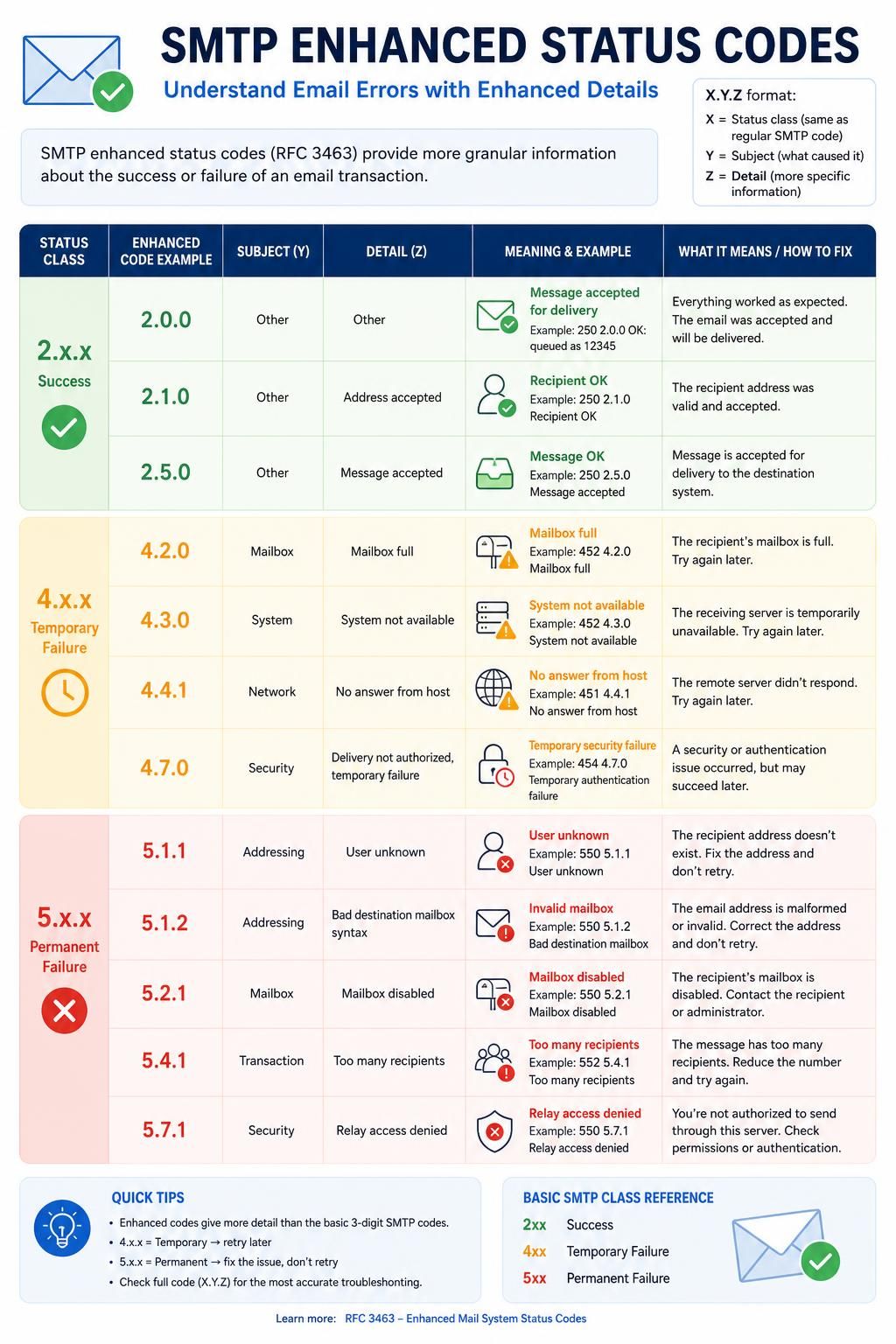
Following the three-digit code, many modern SMTP servers include an enhanced status code (formatted as X.Y.Z) that offers more granular detail about the specific problem, often coupled with human-readable explanations. This refined reporting allows administrators and email senders to pinpoint issues with greater accuracy.
Keeping track of patterns in these bounce codes is vital. For instance, a surge in 550 5.1.1 errors often indicates a list quality problem where addresses no longer exist, while repeated 421 errors could reveal rate limiting by a recipient server. Recognizing and acting on these patterns prevents reputation damage and ensures smoother email delivery workflows.
What the SMTP Rejection Code 550 Actually Means at Protocol Level
550 is one of the most frequently encountered SMTP rejection codes, signaling a permanent failure in message delivery. At the protocol level, it means the recipient’s mail server is refusing the email outright and will not accept retries. The server’s response essentially says, “Requested action not taken: mailbox unavailable.”
This code is a catch-all for a range of issues related to mailbox status and acceptance policies. Distinguishing among its various causes requires examining the accompanying enhanced status codes and rejection messages. Without this context, the code alone tells you only that the message was rejected permanently, necessitating suppression or correction.
Common causes behind a 550 code include invalid or non-existent recipient addresses, sender reputation problems, blocklisting of the sending IP, or content flagged as spam by the receiver’s filters. Each cause requires specific confirmation methods to differentiate it effectively from others.
Confirming Recipient Address Issues Behind 550
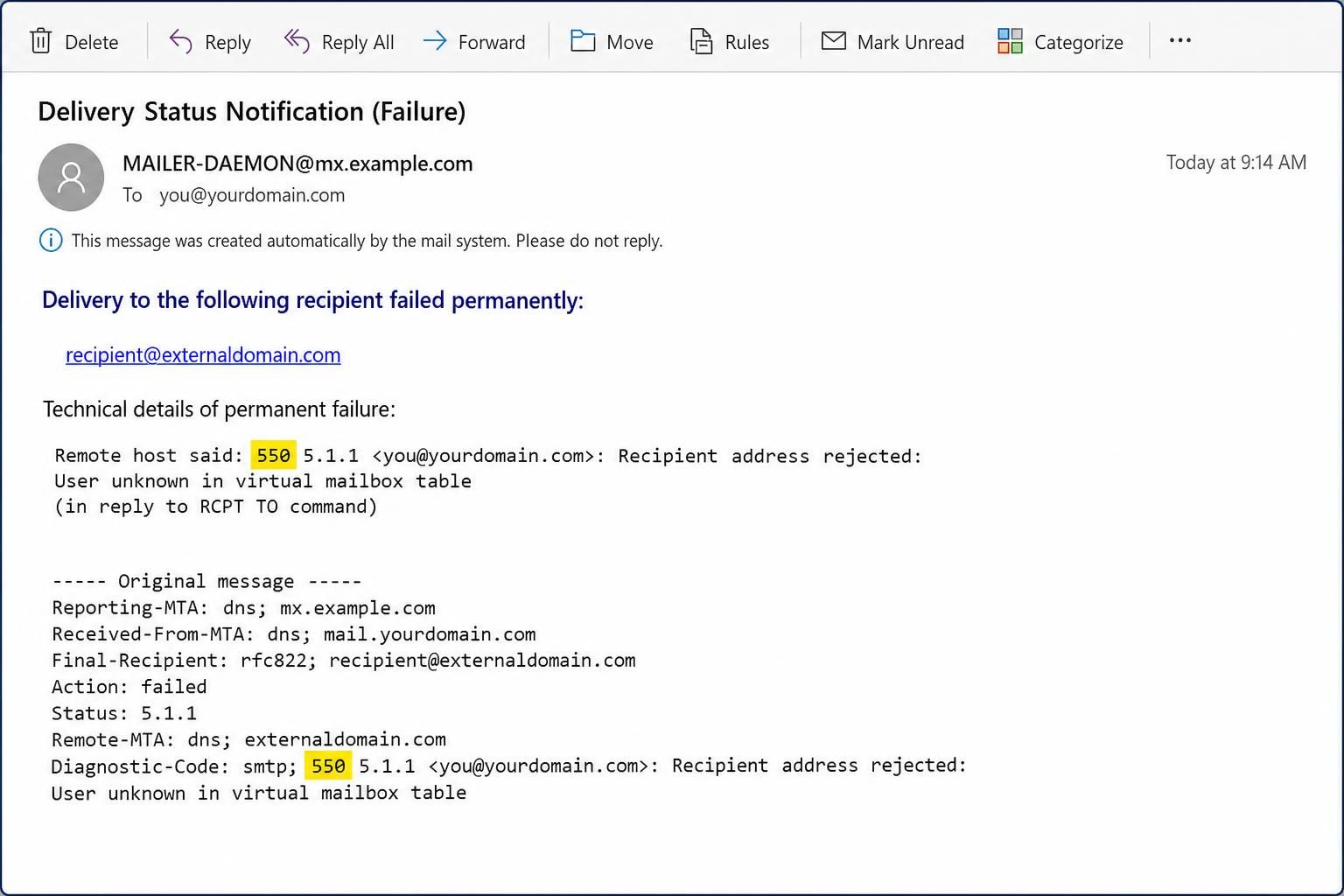
The most common cause for a 550 error is a non-existent recipient address. This often shows up as “550 5.1.1 User Unknown” or similar. To confirm this cause, validate the email address against authoritative sources or perform a mailbox verification service. The definitive test is to check for consistent bounce backs from multiple sending attempts; hard bounces with identical 550 errors indicate a permanently invalid address.
Reputation and Blocklist-Related 550 Errors
If the SMTP response contains phrases indicating blocklisting or reputation problems — often noted as “550 5.7.1 Message rejected as spam” or including Spamhaus references — the failure is due to the sender’s domain or IP being blocked. To confirm, check the sending IP and domain against known blocklists using tools like MXToolbox. A clean IP on blocklists signals the need for delisting requests. Absence of address validity errors distinguishes this cause clearly from mailbox issues.
Content Filtering Triggered 550 Errors
When the message body or headers raise spam suspicion, receiving servers may reject the mail with a 550 code accompanied by content-related messages. Confirmation entails reviewing the rejection text and running the email content through multiple spam scoring tools. Absence of blocklist or address errors combined with a content-specific diagnostic points to reject because of message quality.
Decoding Temporary Failures: The 421 SMTP Rejection Code and How to Identify Its Causes
The 421 SMTP code indicates a temporary refusal to accept messages, a transient failure. At the protocol level, it means “Service not available, closing transmission channel,” suggesting that the receiving server is temporarily unable to process the email. Such errors prompt the sender to retry after a delay.
The key characteristic that sets 421 apart from 5xx errors is its temporary nature, emphasizing a server-side condition rather than message or sender problems. However, multiple underlying causes can trigger this code, and each has distinct diagnostic steps.
Confirming Server Overload or Maintenance as the 421 Cause
When the receiving server is busy due to high load or undergoing maintenance, it responds with 421 to close the connection gracefully. To confirm, test connectivity over time; an improving response pattern suggests a temporary capacity issue. Server status pages or communications from the recipient’s IT department may also confirm maintenance periods.
Identifying Rate Limiting from the Receiving Server
Rate limiting prevents senders from overwhelming a server. Frequent 421 errors from a specific domain paired with consistent send volume spikes point toward this cause. Verification comes from analyzing sending patterns and correlating with the timing of 421 responses. Slowing send rates or distributing email streams across multiple IPs can test this hypothesis.
Diagnosing Persistent 421 Responses and Reputation Throttling
In some cases, persistent 421 errors arise from reputation-based throttling. If the sender’s IP or domain is flagged for suspicious activity, the receiver may delay or block connections temporarily. Checking sender reputation scores and evaluating bounce logs helps confirm this. Unlike actual server overload, sustained 421 responses without service-side acknowledgment call for reputation remediation.
Understanding the 451 SMTP Code: Causes of Local Processing Failures and Testing Strategies
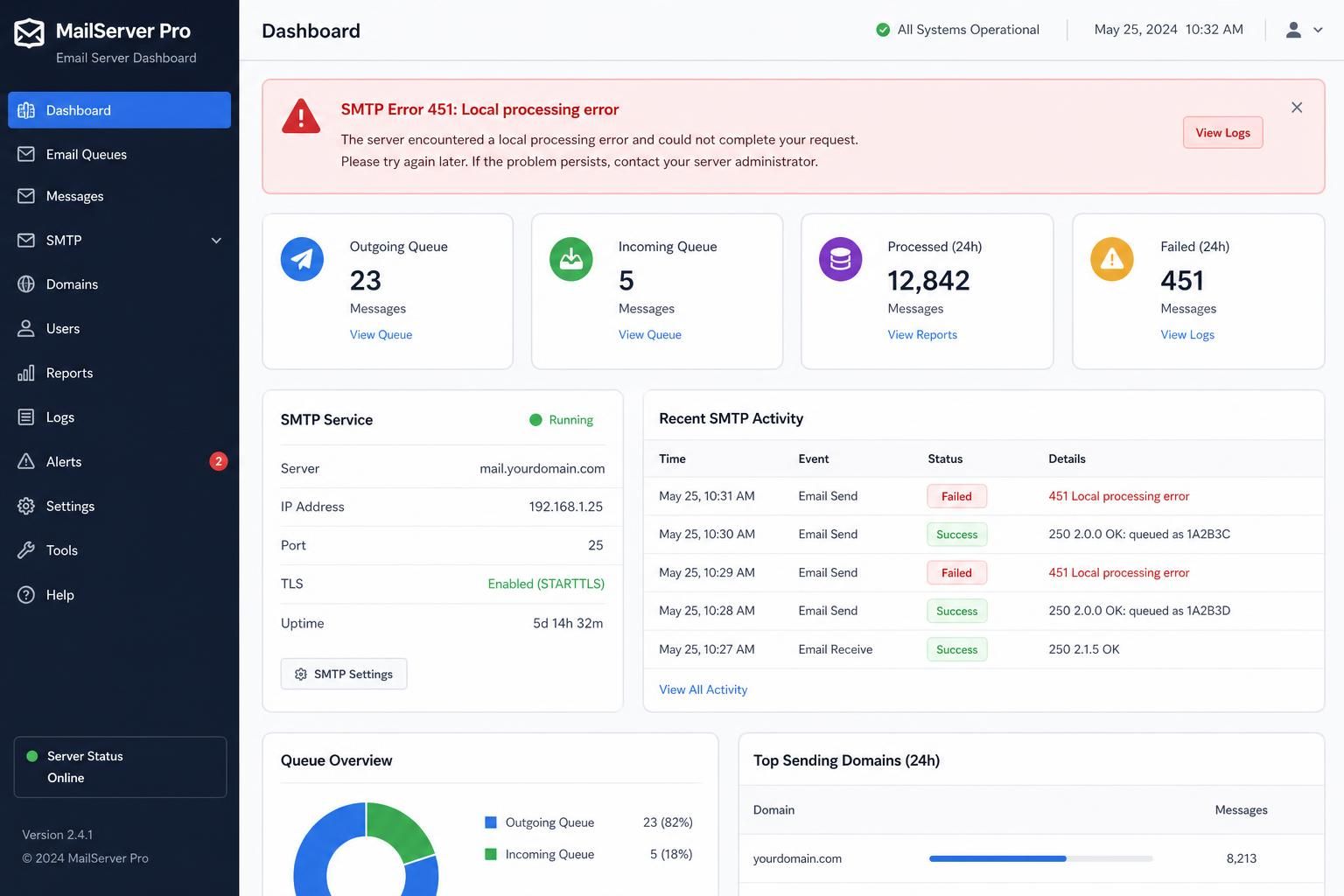
The SMTP 451 rejection code translates to a “Requested action aborted: local error in processing.” Unlike other 4xx codes related to availability or connectivity, 451 indicates a server-side problem during message processing. This temporary failure suggests an issue within the recipient’s mail infrastructure that is beyond the sender’s direct control.
Since 451 errors stem from local errors, confirmation involves distinguishing them from network or anti-spam filters. Persistent 451 errors from a specific domain may point to infrastructural misconfigurations or temporary faults in their mail system.
Confirming Local Server Errors as the Root Cause of 451
Repeated 451 errors targeted to the same recipient domain with no corresponding 421 or 450 errors suggest a genuine local processing fault. The workaround is typically retrying delivery after some time. Monitoring the pattern for resolution can identify temporary faults versus chronic issues requiring recipient-side intervention.
Excluding Other Causes: Connectivity and Policy Checks
Tests to eliminate rate limiting (421) or mailbox unavailability (450) assist in isolating 451 causes. If sender parameters, authentication, and connection quality are good and other error codes are absent, the 451 strongly indicates a process error at the receiving end. Communicating with recipient administrators may then be necessary.
This distinction is critical because actions like suppressing addresses for 451 errors would be premature and damaging; persistence should be observed before altering lists.
Identifying SMTP Error Patterns: When Standard Fixes Do Not Work
While the majority of SMTP errors respond well to targeted troubleshooting, some failure modes defy standard solutions. Recognizing these scenarios prevents wasted effort and strategic missteps.
- Intermittent 421 Errors Persisting: Despite slowing send rates, some recipients continue to return 421 throttling messages due to stringent automated reputation controls, requiring escalated reputation management.
- 550 Errors Without Clear Diagnostic Text: Some servers send generic 550 responses with no enhanced status or explanation, complicating diagnosis and necessitating trial-and-error adjustments.
- Blocked by Unknown External Systems: Occasionally, mail is rejected downstream in ways not reported back properly, causing obscure error codes untraceable to sender-server logs.
- Forwarding Loops and Relay Restrictions: Complex mail routing setups can generate looping rejects or relay denials causing persistent error states immune to changes on the sending side alone.
- Authentication Anomalies: Even with properly configured SPF, DKIM, and DMARC records, authentication failures may occur due to DNS propagation delays or complex forwarding paths.
In these failure modes, escalated steps like direct dialogue with recipient IT teams, enhanced bounce log analysis, and applying SMTPDebug methods become essential.
| SMTP Code | Meaning | Primary Diagnostic Test | Recommended Action |
|---|---|---|---|
| 550 | Permanent mailbox failure or rejection | Check for enhanced status and recipient existence | Suppress invalid addresses, resolve blocklist or content issues |
| 421 | Temporary service unavailability or rate limiting | Monitor retry success and server status | Reduce send rate, retry after backoff |
| 451 | Local error in processing at receiver | Observe persistence and sender parameters | Retry later, contact recipient admin if prolonged |
| 450 | Mailbox temporarily unavailable | Verify mailbox status and retry | Wait and retry, suppress if persistent over 48 hours |
The Role of Enhanced Status Codes in Pinpointing SMTP Errors
Enhanced status codes add precision to bounce codes by breaking down issues into detailed subcategories. These codes, introduced by RFC 3463, are presented as X.Y.Z after the main reply code.
For example:
- 5.1.1 – Bad destination mailbox address, indicating the recipient address does not exist.
- 5.7.1 – Delivery not authorized, usually due to policy or content issues like spam filtering or DKIM failures.
- 5.7.26 – Specific to Microsoft 365, indicating DMARC policy failure.
Recognizing these enhanced indicators enables support teams to separate authentication failures from policy rejections or address errors, tailoring remediation strategies accordingly. For instance, an increase in 5.7.x failures typically signals authentication problems requiring SPF, DKIM, and DMARC auditing.
Essential Practices for Monitoring and Acting on SMTP Bounce Codes
Managing bounce codes effectively requires systematic monitoring and smart response processes. Teams maintaining optimal deliverability adopt the following principles:
- Immediate Suppression of Hard Bounces: Any 5xx permanent rejection, especially 550 5.1.1, should be suppressed straight away to protect sender reputation.
- Retry Strategy for Soft Bounces: Automatically retry 4xx codes with increasing backoff intervals. If soft failures persist beyond five days, treat them as hard bounces.
- Bounce Rate Tracking: Maintain bounce rates below 2-3% per sending domain. Elevated rates require list cleaning or targeting adjustments.
- Diagnostic Pattern Analysis: Analyze bounce reasons, not just volumes. Diverse 5.7.x spikes versus 5.1.1 spikes demand unique interventions.
Skipping any of these steps can lead to slow degradation of deliverability, which may manifest as increased bounce rates, complaints, and eventual blacklisting. Embedded tools in ESPs usually automate this, but direct SMTP sending requires robust bounce parsing.
What is the difference between 4xx and 5xx SMTP error codes?
4xx codes indicate temporary failures where the server suggests retrying later, while 5xx codes denote permanent failures that require correction before resending.
How to confirm if a 550 error is due to a non-existent email address?
Verify the recipient address through mailbox validation services and look for consistent 550 5.1.1 hard bounces indicating the address does not exist.
Why do some SMTP servers return 421 errors repeatedly?
Repeated 421 errors may result from server overload, ongoing maintenance, or rate limiting based on sender reputation and sending volume.
What actions should be taken for persistent 451 errors?
Retry sending after delays, and if persistent, contact the recipient server administrator as it indicates local errors processing messages on the recipient side.
What is the best way to handle soft bounces in email campaigns?
Implement a retry strategy with increasing intervals, and if soft bounces persist after several days, suppress those addresses to maintain sender reputation.
