
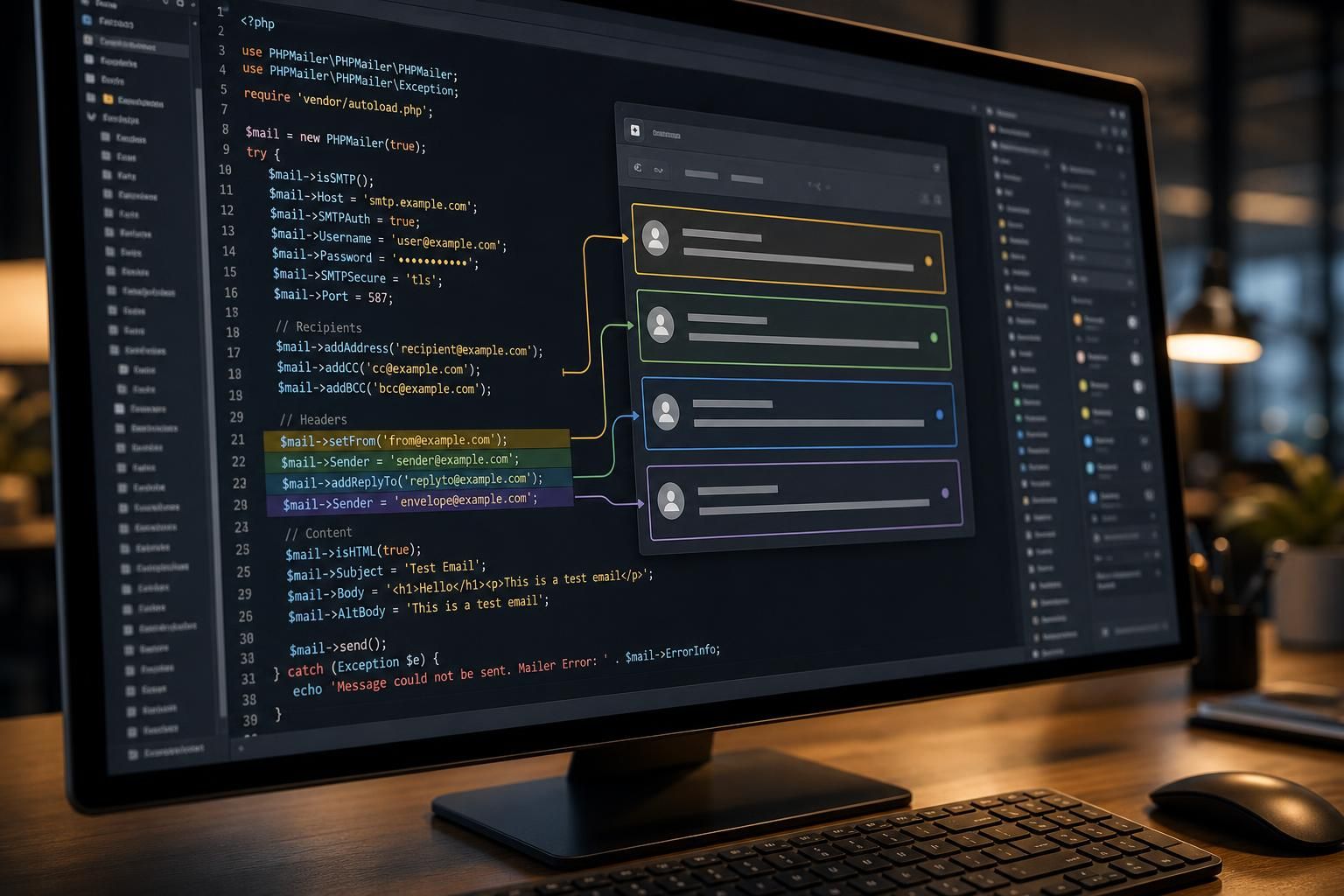
The interplay between the From, Sender, Reply-To, and Envelope Sender fields in PHPMailer is crucial for ensuring proper email delivery, authentication, and preventing spoofing. These elements are distinct parts of the email headers and SMTP protocol, but often confused or misconfigured, leading to issues like emails landing in spam or being rejected. Understanding their roles, differences, and how PHPMailer handles them at a protocol level is essential for developers aiming to optimize mail delivery and ensure compliance with modern email authentication standards.
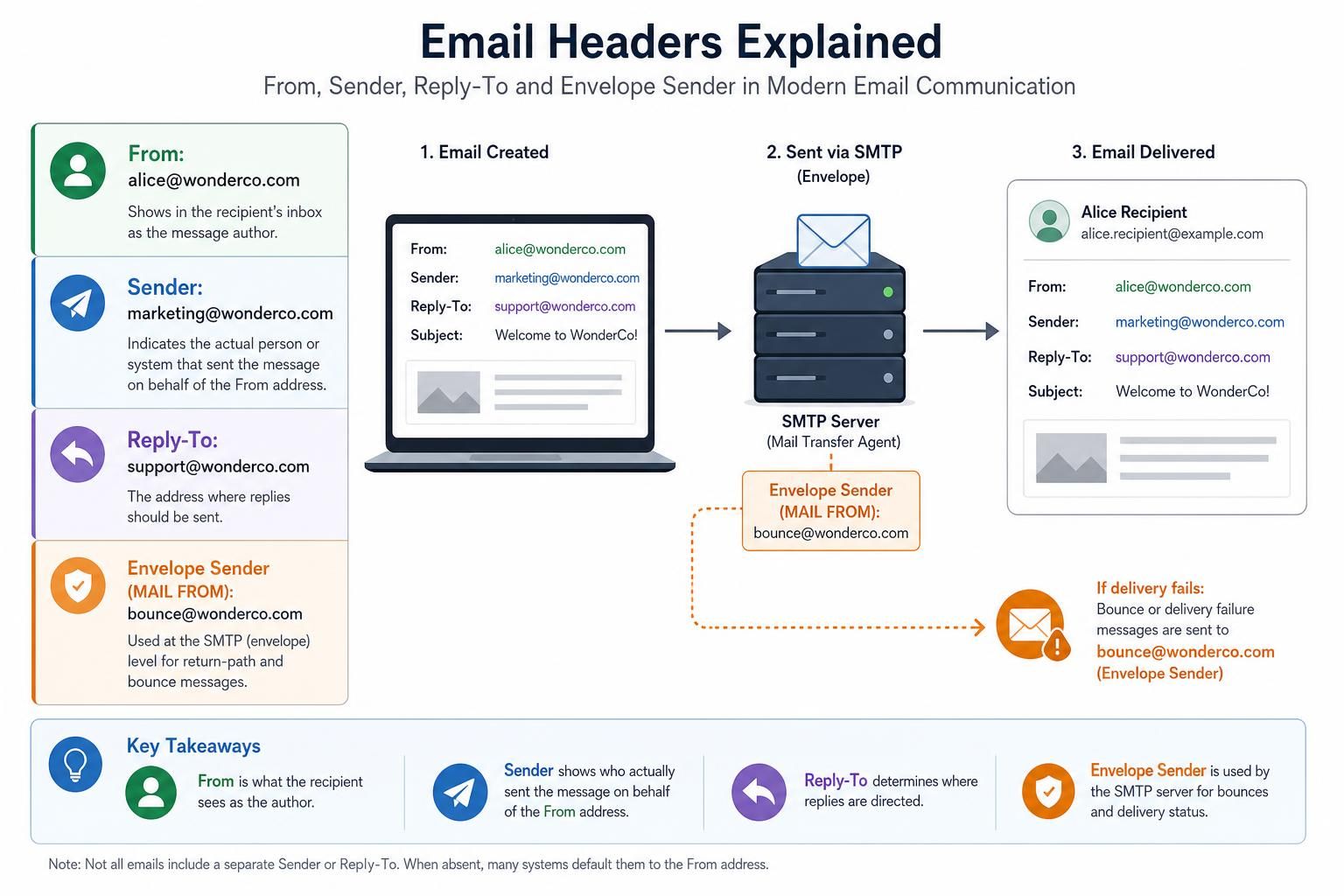
At the SMTP protocol level, the Envelope Sender (sometimes called the “Return-Path”) is the address used during the SMTP dialogue to identify where bounce messages should be sent. It is specified at the “MAIL FROM” stage in SMTP and is critical for email spoofing prevention. This is distinct from the From header, which is the visible sender address shown to the recipient. The Sender header comes into play when the sender is different from the author of the message, often used in mailing lists or forwarding scenarios. The Reply-To header sets the email address that replies should be directed to, which can differ from the From address.
Confusion happens because these fields interact at different layers: SMTP transaction vs. email message headers. PHPMailer offers explicit handling of these fields to enable correct specification, which can positively affect email authentication (SPF, DKIM, DMARC) and delivery success.
What the From Address Actually Means in PHPMailer and Email Headers
In PHPMailer and SMTP email communication, the From address is the primary identifier of the message sender that the recipient sees. It is included in the email header as the “From” field and usually represents the author or originator of the email content.
At the protocol level, the From header is part of the message data transmitted after the SMTP envelope is negotiated. It sets the “display sender” and is crucial for how recipients recognize the email origin.
It’s important to distinguish that the From field does not influence SMTP bounce handling—this is reserved for the envelope sender—but it is essential for passing email authentication checks. For example, SPF records require that the From domain aligns with the sending server to help prevent spoofing.
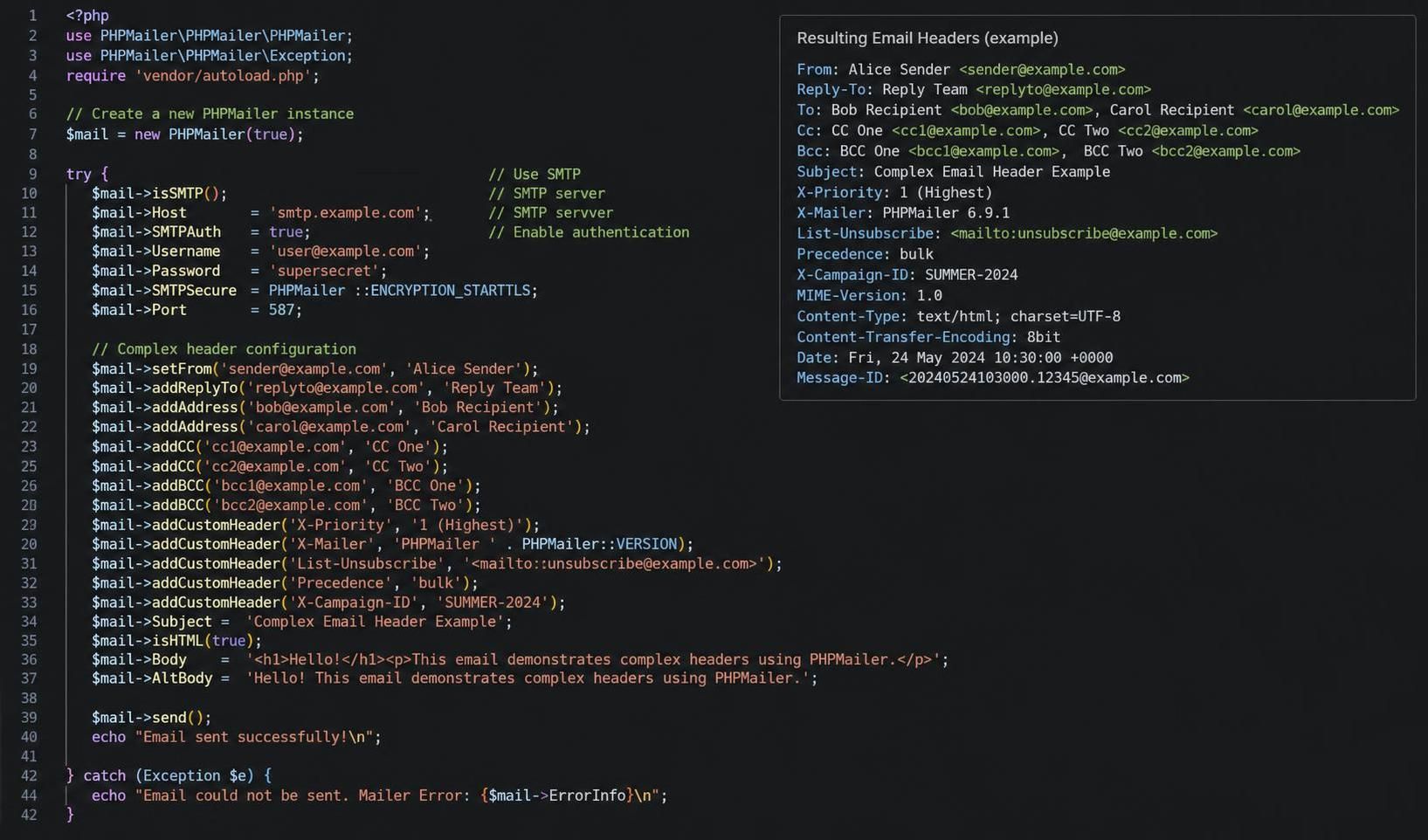
PHPMailer allows developers to set the From address using the setFrom() method. This method updates the “From” header and internally associates the display name with the address.
To confirm that the From address is set correctly in PHPMailer, check that the email header contains the appropriate From: line. This can be verified by capturing the raw email headers or enabling SMTP debug output in PHPMailer (see SMTPDebug Reference).
If the From field is incorrect or missing, recipients might see the email as suspicious, and spam filters could downgrade or outright reject the email.
Understanding the Sender Header: When and How to Use It in PHPMailer
The Sender header specifies who actually sent (or authorized the sending of) the email when this differs from the author indicated in the From address. It is often employed in scenarios involving mailing lists, delegated email addresses, or where an intermediary service sends emails on behalf of another.
At the SMTP protocol level, the Sender header is optional but useful to provide clear sender provenance, which can help with compliance and delivery.
PHPMailer permits setting the Sender header via the Sender property. This must be set explicitly if the envelope sender differs from the From address and you want to signal this difference in the headers.
To confirm if the Sender header is applied, inspect the email headers for “Sender:” field. It is particularly crucial to test and confirm this when using third-party SMTP providers that require envelope sender alignment.
The main test distinguishing this cause of header misconfiguration is whether the mail server is reporting authentication issues related to sender identity mismatches. Such as SPF failures or DMARC policy rejections. Sending an email with PHPMailer and examining the SMTP logs or debugging outputs will reveal if the Sender header is properly set and consistent with the envelope sender.
The Role and Configuration of Reply-To Header in PHPMailer for Effective Email Responses
The Reply-To header doesn’t affect where the email is sent or bounce handling but instructs mail clients where to route replies. This is particularly useful when the From address is not the intended recipient of replies, such as in customer service or no-reply scenarios.
PHPMailer allows setting the Reply-To header via the addReplyTo() method, accepting both email address and optional display name. Correct use improves user experience and helps maintain communication workflows without breaking email authentication norms because it doesn’t affect SMTP envelope transactions.
You can check the proper use of the Reply-To header by looking at the raw headers of the sent messages or enabling SMTP debug mode. If replies are not reaching the intended mailbox, verify this header’s presence and accuracy.
Understanding when and why to utilize this header separates it from From and Sender. It is purely an email client-level routing hint rather than a server-level protocol element.
Setting the Envelope Sender in PHPMailer: Importance and Troubleshooting
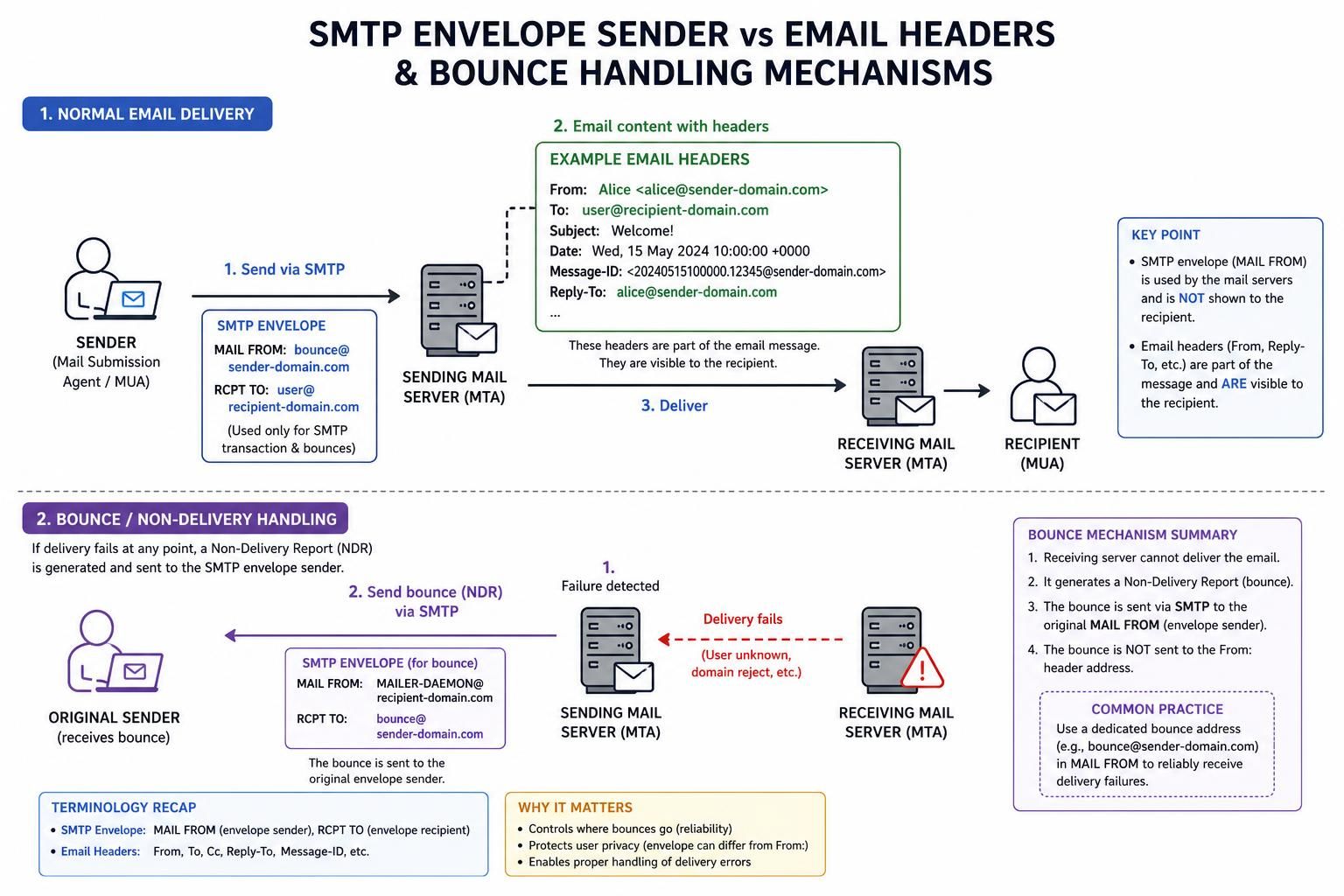
The Envelope Sender is the address specified during the SMTP protocol “MAIL FROM” command. It is fundamental for how servers handle bounces and feedback loops. Unlike the From or Reply-To headers, which are in the email body, the envelope sender is a component of the SMTP transaction.
PHPMailer permits explicit control of the envelope sender via the Sender property or the optional fifth parameter in the mail() function. By default, PHPMailer sets the envelope sender to match the From email unless overridden.
Because email authentication mechanisms such as SPF rely on the envelope sender, improper setting can cause emails to be flagged or rejected. This is especially relevant when sending on behalf of different domains or using third-party SMTP servers.
To confirm the envelope sender, check the SMTP logs or the bounce messages received. email headers like “Return-Path” reflect the envelope sender after delivery, though they are inserted by receiving mail servers, not the sending application.
Failing to set the envelope sender correctly is one of the most frequent causes of deliverability issues. The test distinguishing this from other header problems is to compare the SMTP transaction logs with the headers in delivered mail and observe bounce notifications.
Common Delivery Failures Involving From, Sender, Reply-To, and Envelope Sender in PHPMailer
Despite correct settings, emails may still fail delivery due to multiple failure modes related to these fields. Understanding where standard fixes fail is critical for diagnosing persistent issues in a 2026 email ecosystem.
- SPF and DKIM Failures: When the From domain doesn’t align with SPF or DKIM records of the sending server, recipient servers may block messages. This happens even if the envelope sender is correct, and requires DNS record updates rather than code changes.
- Mail Server Restrictions: Some hosting providers restrict use of arbitrary envelope senders or require that the envelope sender match authorized domains. Changing
Senderin PHPMailer won’t fix it if the server rejects non-matching addresses. - Misconfigured Reply-To Addresses: If reply addresses use domains that fail validations or are marked suspicious, replies may silently fail or not be delivered. This is usually not evident in sent mail logs.
- Third-party SMTP Server Policies: Servers like Gmail, Outlook, or MailerSend may enforce strict policies that override supplied headers to prevent spoofing, rewriting envelope sender or From addresses.
- Caching and DNS Propagation Delays: After adjusting SPF/DKIM/DMARC records or email configuration, it may take hours or days before changes propagate, resulting in temporary failures or spam flagging.
| Field | Policy Effect | Typical Issue When Misconfigured | How to Verify |
|---|---|---|---|
| From | Visible sender, linked to SPF/DKIM authentication | Marked as spam or phishing | Check headers, SPF/DKIM test tools, SMTP debug |
| Sender | Identifies actual sending party if different from From | Authentication failures, delivery rejection | Inspect headers, verify SMTP logs, debug output |
| Reply-To | Directs replies to preferred mailbox | Replies lost or misdirected | Review raw headers, test reply behavior |
| Envelope Sender | Bounce address, key for SPF verification | Bounces, blocks, failed delivery | Review SMTP transaction, bounce messages |
In rare cases, email forwarding services or mailing lists modify these headers further, causing unexpected effects like misaligned authentication or confusing recipients. Troubleshooting requires an understanding of each header and how PHPMailer configures them.
For detailed SMTP debugging, consult the PHPMailer SMTPDebug documentation to gain insight into SMTP session details and trace message delivery steps thoroughly.
How does the Envelope Sender differ from the From header in PHPMailer?
The Envelope Sender is used at the SMTP protocol level to specify the return address for bounces, while the From header is the visible sender that recipients see in their email client. PHPMailer allows independent setting of both, with the Envelope Sender often defaulting to the From address unless changed.
When should I use the Sender header in my emails?
The Sender header should be used when the actual sender differs from the From address, such as in mailing lists, third-party senders, or delegated mailboxes. It clarifies the authorized sender and can assist with authentication and compliance.
Does setting Reply-To affect email authentication or delivery?
No, Reply-To only guides where replies are sent at the client level and does not impact SMTP-level authentication or delivery. It’s mainly a convenience for directing user responses.
How can I set the Envelope Sender in PHPMailer?
You can set the Envelope Sender in PHPMailer by assigning the email address to the Sender property, such as $mail->Sender = ‘bounce@yourdomain.com’;. This will be used during the SMTP MAIL FROM command to specify the bounce address.
Why are my emails ending up in spam despite correct From and Sender headers?
Even with correct headers, factors like missing or incorrect SPF, DKIM, or DMARC records, content flagged as spam, or IP blocklisting can cause emails to land in spam. Ensure all authentication mechanisms are properly configured and test with tools that analyze spam characteristics.
The understanding and correct configuration of From, Sender, Reply-To, and the Envelope Sender in PHPMailer significantly influence successful mail delivery, compliance with email authentication protocols, and prevention of email spoofing. Developers should leverage PHPMailer’s features to distinctly set each field as needed, validating configurations with SMTP debug tools and observing server feedback for optimal results.
