

“DKIM signature body hash did not verify” is an error message encountered during email verification that signals a mismatch between the cryptographic hash of the email’s body content and the hash value embedded within the DKIM signature. This discrepancy indicates that the message’s integrity has been compromised or altered in transit, triggering authentication failures. Understanding this error requires a close examination of the DKIM protocol’s role in email authentication and the mechanisms of body hash verification.
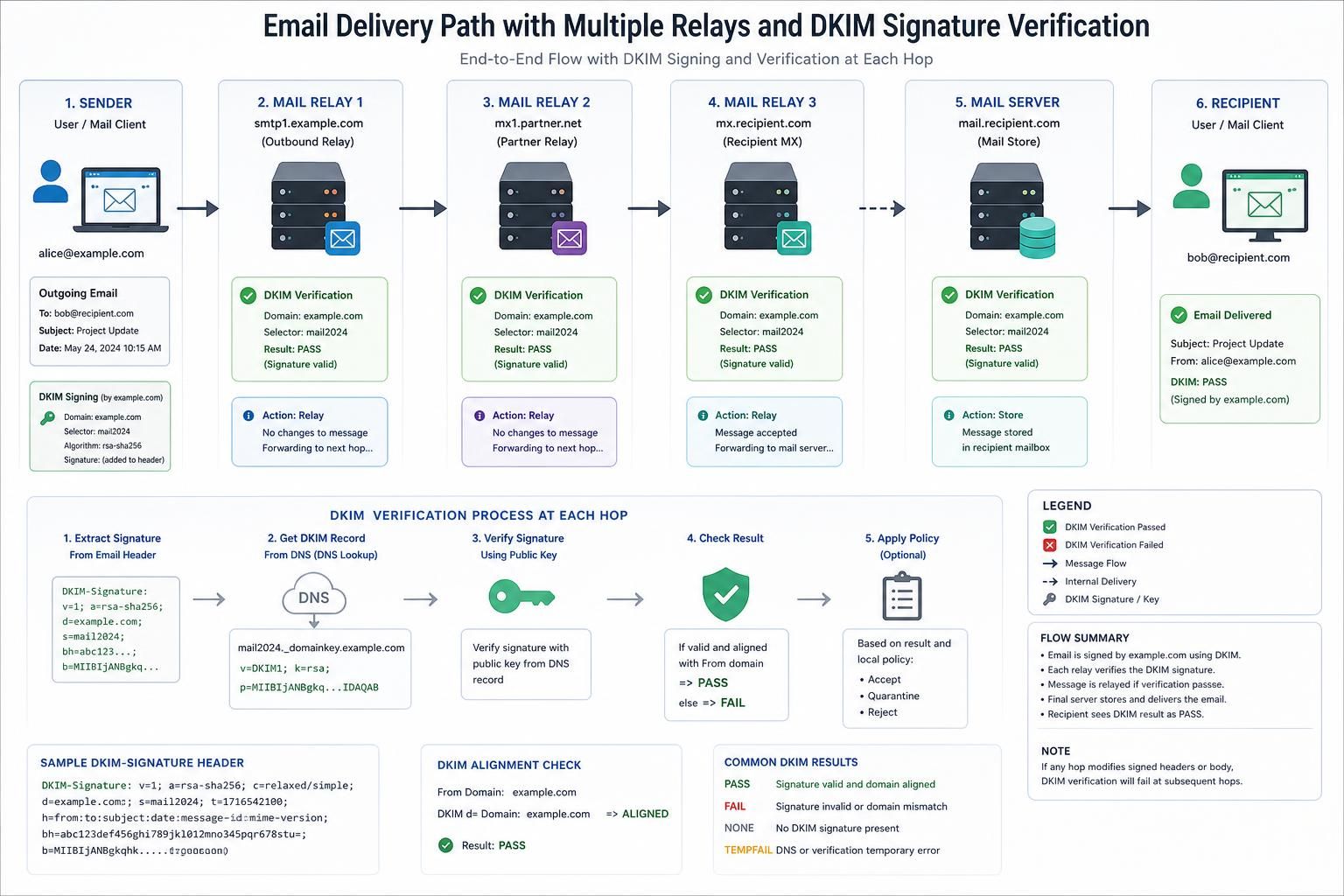
At the protocol level, DomainKeys Identified Mail (DKIM) attaches a digital signature to an outgoing email by hashing specific headers and the message body. The signature, stored in a cryptographic format, is validated by the recipient’s server against the original content. The body hash is a digest of the email content, created using algorithms like SHA-256, ensuring that the message has not been tampered with during transit. When the body hash verification fails, it means the calculated hash of the received email body does not match the hash within the signature, implying alteration or inconsistency.
This error is pivotal in email security because DKIM, combined with other protocols like SPF and DMARC, aids in preventing email spoofing, phishing attacks, and spam. Diagnosing the real cause behind this failure requires distinguishing among several scenarios that produce similar outcomes but stem from different origins.
Differences in Email Body Content Altering DKIM Signature Body Hash Verification
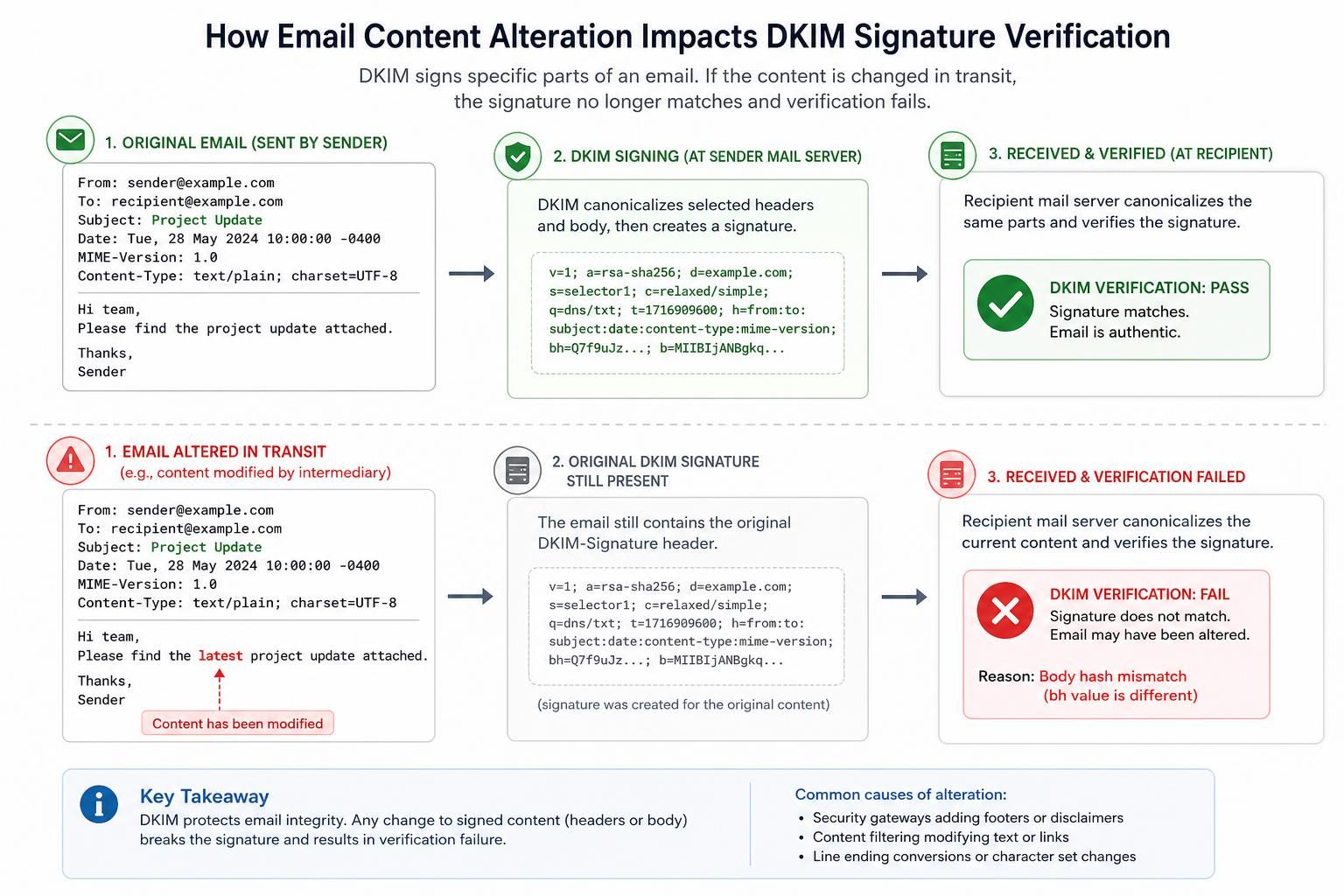
One of the primary causes behind the “DKIM signature body hash did not verify” message is a modification in the email’s body after signing. This change can occur either due to intentional or unintentional alterations between the moment the message was signed and when it’s verified.
Such modifications might be introduced by email forwarding services, antivirus scanners, or mailing lists that trim, format, or append data to the message body. For instance, a forwarding server might add a footer or disclaimer text, or a security gateway could remove specific elements like inline images or signatures, disrupting the original hash.
To confirm that the email body was altered post-signing, inspect the raw MIME source of the message as received and perform a byte-by-byte comparison with the original signed version, if accessible. Absence of exact byte-level matching usually signals body alteration. tracing the email’s path and examining intermediary servers’ policies can reveal automated modifications.
This test distinguishes content modification from other causes like DNS misconfigurations because the former involves the observable mismatch in message body content. Tools such as SMTP debug outputs, described in the SMTPDebug reference, can assist in capturing raw message content at different stages.
For example, an email sent by a marketing platform may have undergone automatic HTML minification or URL rewriting that changes the body content marginally, leading to DKIM verification failure despite legitimate origination. Identifying these changes allows administrators to configure or bypass these processing steps to maintain message integrity.
DNS Records Misconfiguration Affecting DKIM Public Key Retrieval
Another common cause for DKIM signature body hash verification failure originates from DNS-related issues, particularly those involving the DKIM public key records.
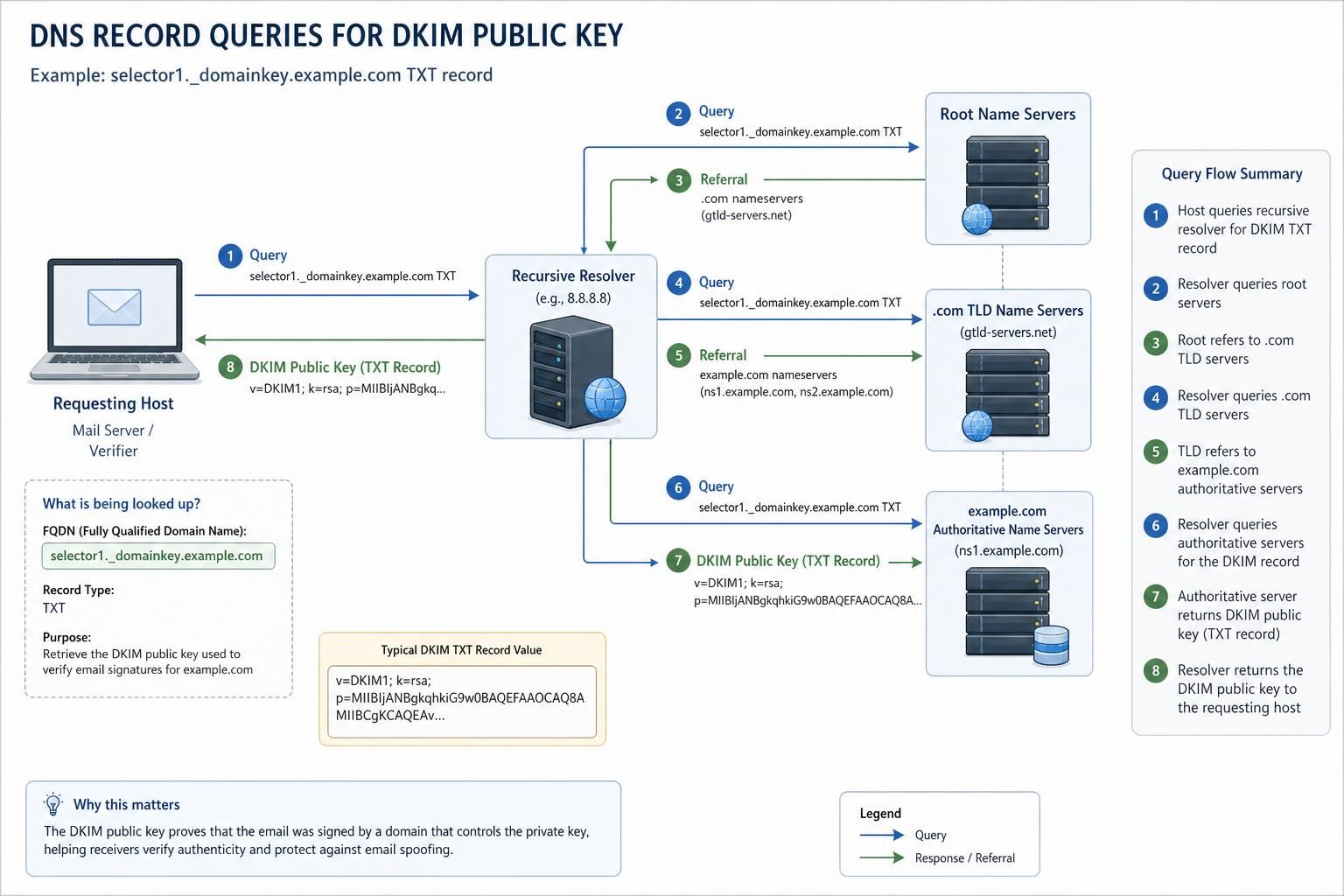
The DKIM mechanism depends on querying DNS to retrieve the public key corresponding to the signing domain and selector embedded in the signature header. If DNS records are misconfigured—such as missing, incorrectly formatted, or expired TXT records—the verification process either fails to obtain the correct key or uses an incorrect one, resulting in a hash mismatch error.
Testing this hypothesis involves querying the DNS manually using tools like dig or nslookup for the TXT record linked to the DKIM selector (e.g., “selector._domainkey.example.com”). Confirm the existence, syntax correctness, and matching of the public key to what the sending server uses for signing. DNSSEC validation can additionally ensure the integrity of these DNS responses.
Unlike body modifications, DNS-related causes are distinguished by successful retrieval of the message body but failure in signature decryption or validation because the public key does not match the private key used during signing. Reviewing DNS propagation delays or TTL conflicts is also relevant since recently updated records might not be universally accessible yet.
For instance, an organization recently rotating its DKIM keys but failing to update or properly publish its DNS records will experience this error on outgoing mail verification. Diagnosis requires tight coordination between email system administrators and DNS operators to resolve discrepancies.
Encoding and Line Ending Discrepancies Impacting DKIM Body Hash Verification
Encoding mismatches, particularly in line endings and character sets, can cause the “DKIM signature body hash did not verify” error, though the email’s visible content seems untouched.
DKIM specifies requirements for canonicalization of the email body before hashing, often involving the normalization of line endings (CRLF vs. LF) and white space. If the sending and receiving servers treat encoding or line endings differently—for example, altering line breaks while processing mail—the calculated hash at verification will not align with the signed hash.
Distinguishing encoding and format issues requires an examination of the canonicalization method specified in the DKIM header (usually “simple” or “relaxed”). Capturing the exact bytes of the message body as signed (before transmission) and as received contrasts the differences in line endings, white space, or encodings.
Practical testing involves sending diagnostic emails with known line endings to controlled test mailboxes and analyzing their raw sources. Automated email gateways or clients may correct or modify embedded line breaks, thus invalidating the DKIM body hash. Unlike body content changes affecting visible text, encoding issues mainly reveal themselves in the raw message structure.
For example, when a Unix-based mail server signs an email with LF line endings, but a downstream Windows-based relay converts LFs to CRLFs, the verification hash will not match unless canonicalization accounts for this difference.
Mail Transfer Agents Altering Message Headers or Adding Trailing Characters
Mail Transfer Agents (MTAs) sometimes inadvertently modify outbound messages, which can disrupt DKIM verification through body hash failure. These modifications often include header rewriting, line wrapping, or insertion of trailing white space or blank lines.
Confirming this cause requires capturing the email at the exact moment of signing and comparing it with the version just before delivery to the recipient. Many MTAs introduce such changes for compliance with email standards or corporate policy enforcement but might not be fully DKIM-aware.
Testing can involve using verbose logging or enabling debug-level output on MTAs to document message handling steps. Comparing outputs demonstrates if post-signing transformations have impacted the message body or even header fields included in the signature. This distinguishes MTA modifications from body rewriting by external filters or forwarding services.
As an example, an enterprise outgoing mail relay might append a disclaimer banner or compliance footer, altering the signed message contents. When DKIM was applied prior to these alterations, the verification will report body hash verification failure.
Complex Failure Modes: When Standard Fixes Do Not Resolve DKIM Body Hash Verification Issues
Despite applying canonicalization corrections, ensuring DNS record integrity, and controlling mail relay behavior, failures in DKIM signature body hash verification sometimes persist. These complex failure modes stem from intricate interactions among mail software components, network devices, or content delivery systems.
Such modes include:
- Subtle character set conversions: Transcoding between UTF-8 and legacy encodings might introduce invisible byte changes.
- Multipart message boundary changes: Alteration or rearrangement of MIME boundaries without modifying the visual message.
- Compression or encryption layers: Some content processing tools apply transparent compression or partial encryption that changes the effective byte sequence.
- Inconsistent DKIM canonicalization settings: Different components may use conflicting canonicalization algorithms, leading to verification mismatches despite apparent identical content.
Distinguishing these scenarios requires an exhaustive audit of all mail processing stages, including client-side composition, server-side filtering, network transport, and recipient mailbox operations.
Administrators encountering persistent errors should consider employing advanced diagnostic tools capable of tracing mail message transformations down to the byte level, complemented by audits of all related DNS setups and cryptographic configurations.
| Failure Mode | Distinguishing Test | Typical Cause |
|---|---|---|
| Character Set Conversion | Compare raw byte streams pre- and post-transcoding | Invisible changes in Unicode or legacy encoding |
| Multipart Boundary Alteration | Analyze MIME boundary consistency in source and received email | Reordering or modification by mail filters |
| Compression Layers | Inspect message headers for content encoding flags | Automated content compression by gateways |
| Inconsistent Canonicalization | Verify consistent DKIM canonicalization specs across all mail components | Misaligned configuration on signing and verification endpoints |
For those troubleshooting email authentication, referencing SMTP debug output protocols and formats, such as described in the SMTPDebug documentation, can provide invaluable insights into where and how changes occur.
What does the ‘DKIM signature body hash did not verify’ error specifically indicate?
It signifies that the cryptographic hash of the email’s body content calculated during verification does not match the hash embedded within the DKIM signature, suggesting the message body was altered after signing or that verification failed due to other inconsistencies.
How can I test if the email body was modified after signing?
Obtain the raw source of the email as signed and compare it byte-for-byte with the raw source as received. Differences usually indicate that the body content was altered during transit or by intermediate systems.
Why do DNS issues affect DKIM body hash verification?
The DKIM process relies on retrieving the correct public key from DNS. Misconfigured or missing DNS TXT records can cause incorrect verification attempts and hash mismatches, even if the email body is intact.
Can line ending differences really cause DKIM body hash verification to fail?
Yes. Differences in line ending formats (LF versus CRLF) between signing and verification stages can alter the hashed content unless the canonicalization method used accounts for such variations.
What should administrators do when standard DKIM fixes don’t resolve verification failures?
They should conduct a comprehensive audit of all mail processing steps, check encoding and canonicalization configurations, verify DNS records, and utilize advanced diagnostic tools for tracing message transformation byte-by-byte.
