

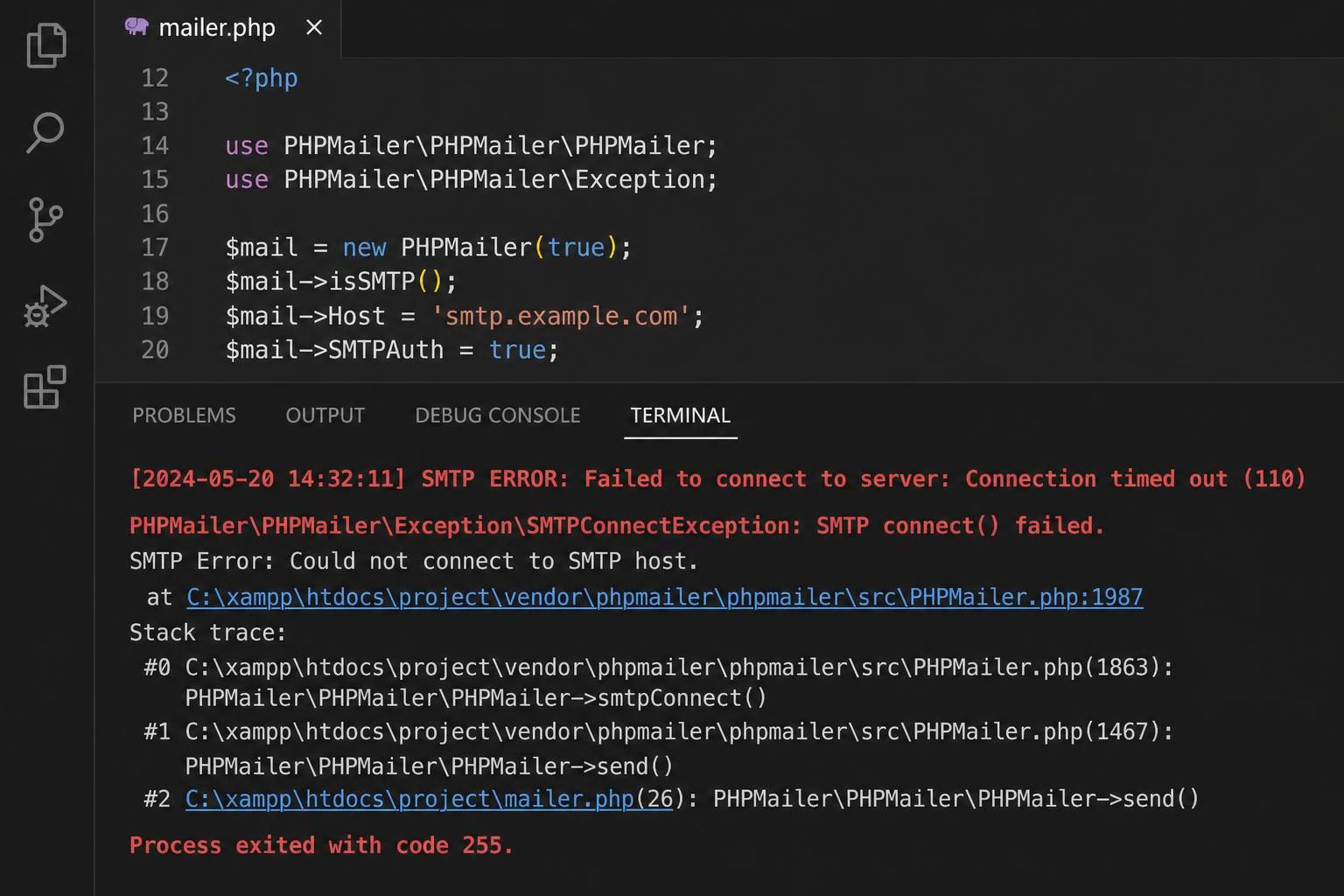
The error message PHPMailer “SMTP connect() failed” is one of the most common and frustrating hurdles encountered when attempting to send emails via PHPMailer. It indicates that PHPMailer was unable to establish or upgrade the SMTP connection to a usable state for sending mail. At the protocol level, this failure can happen anywhere along the path: during DNS resolution of the SMTP host, the initial TCP handshake, TLS or SSL negotiation, certificate verification, or just after receiving the SMTP service banner. Understanding the exact meaning of this message is crucial for accurate and efficient troubleshooting, especially in the diverse and complex email infrastructure landscape that persists in 2026.
This diagnostic guide delves deep into the core meaning of this failure, differentiates between distinct causes, details tests unique to each case, and highlights failure modes where usual remedies don’t suffice. It equips developers and administrators alike with the insight to interpret SMTPDebug output accurately and to avoid common pitfalls such as prematurely changing SMTP credentials or disabling encryption.
Whether you’re operating on shared hosting with restricted outbound SMTP ports or managing your SMTP connectivity on a dedicated server, this guide is structured to clarify the nature of “SMTP connect() failed” and lead you through logical steps that isolate and resolve connectivity issues efficiently.
In brief:
- “SMTP connect() failed” indicates PHPMailer cannot establish or upgrade the SMTP connection enough to reach the authentication phase.
- Errors during DNS resolution, TCP handshake, TLS negotiation, or certificate verification are common underlying causes.
- Routine changes like rotating SMTP passwords won’t help if authentication hasn’t started due to connection issues.
- Understanding SMTPDebug logs is key; focus on the first failing line in the debug output to pinpoint the failure stage.
- Port blocking by hosting providers, incorrect SMTP hostnames, and encryption misconfiguration are dominant causes.
- Shared hosting environments often impose outbound SMTP restrictions impacting PHPMailer connections.
- Verifying the network path stability, encryption pairing, and DNS resolution is critical before modifying credentials.
What “SMTP connect() failed” Really Means at the Protocol Level
The error “SMTP connect() failed” appears when PHPMailer, a PHP email sending library, cannot perform an SMTP connection sequence complete enough to proceed to the authentication stage. SMTP, or Simple Mail Transfer Protocol, usually requires several steps before authentication: resolving the SMTP host to an IP address, establishing a TCP connection on the designated port, negotiating encryption protocols like STARTTLS or SSL, and verifying the server’s certificate.
Failures at any of these critical moments halt the sequence and trigger the “SMTP connect() failed” error. For example, if PHPMailer cannot resolve the hostname—such as when the SMTP host is incorrect or includes a URL scheme (like https://) or a path—then connection attempts do not even leave the local machine. Equally, if the SMTP server refuses the connection or the chosen port is blocked by the firewall, PHPMailer never receives the SMTP banner greeting, stalling the connection before authentication.
Similarly, if encryption negotiation fails—common in misconfigured TLS settings or certificate issues—the connection is terminated, and the failure reported. This failure is distinct from authentication issues: the server must first accept a stable encrypted or unencrypted connection before PHPMailer attempts the login. Therefore, before jumping to credential changes, the underlying network and encryption handshake must be verified for stability.
A thorough understanding of this definition directs diagnostic efforts to where they matter most — DNS, network ports, encryption, and certificates — not prematurely changing SMTP credentials or disabling security, which are frequent but ineffective remedies for this error.
DNS or SMTP Hostname Resolution Issues Confirmed by PHPMailer Debug Output
If PHPMailer’s SMTP connection fails with debug messages including “getaddrinfo”, “Name or service not known”, or “host cannot be resolved”, the cause is almost certainly related to DNS problems or using an invalid SMTP host configuration. This points toward PHPMailer’s inability to translate the SMTP hostname into an IP address, which is a critical first step when establishing a connection.
Test this cause by performing a DNS resolution check from the server where PHPMailer runs. Using tools like nslookup or dig on the hosting environment or server shell will confirm if the hostname is resolvable. If it’s a shared hosting environment, some restrictions may limit DNS queries, but typically the error points out a typographical or formatting problem with the SMTP host.
Common mistakes include:
- Using a full URL including “http://” or “https://” instead of a hostname like smtp.example.com.
- Including a path in the host, such as smtp.example.com/mail.
- Specifying a hostname that doesn’t exist or is misspelled.
- DNS not propagated or cached incorrectly in the server’s resolver.
Confirm the diagnosis by removing any protocol schemes or additional URL parts from the host setting and verifying DNS resolution on the server:
- Run
ping smtp.example.comornslookup smtp.example.comin the environment where PHPMailer runs. - If DNS is unreliable on the hosting service, contact the host or use an IP fallback just as a temporary diagnostic test (not recommended for production).
Only once the hostname resolves correctly should you proceed with testing SMTP ports and encryption configs. Rotating passwords or changing authentication parameters at this stage will not fix the connection error and will only delay resolving the real issue.
Test Method to Distinguish DNS Issues
Run the diagnostic: nslookup [SMTP_host] on the server hosting your application.
If the command fails or returns no IP, DNS resolution is broken or the hostname is invalid, confirming the DNS cause of the SMTP connect failure.

Blocked Ports or Refused Connections: Network-Level Blockages Explained
A debug output noting messages like “Connection refused”, “Network is unreachable”, or no SMTP banner received strongly indicates the SMTP connection attempt was blocked or refused by the network or SMTP server. This commonly results from outbound SMTP port blocking by hosting providers, firewall rules, or incorrect port configuration in PHPMailer.
The most frequently used SMTP ports are 587 (STARTTLS/TLS), 465 (SSL), and 2525 (alternative port from some providers). Using the wrong port or firewall blocking these ports will cause connection refusal or timeouts with no response from the SMTP server. In shared hosting environments, especially, these ports are often restricted to limit spam or abuse.
To confirm this cause specifically:
- Attempt a
telnet smtp.example.com 587,telnet smtp.example.com 465, andtelnet smtp.example.com 2525from your server or hosting environment. - If none of these succeed with a TCP connection, the network is blocking SMTP traffic.
- Check host documentation or contact support to verify which ports are open for outbound SMTP.
Another clue is that if the SMTP server is well-known and the configuration is correct, but repeated attempts yield “connection refused,” the cause lies at the network or host firewall level, not the credentials or PHPMailer settings.
Test Method to Distinguish Port or Network Block
Perform telnet or nc (netcat) tests from your server to the SMTP host and port.
Failure to establish a TCP connection confirms networking or firewall obstruction, distinguishing this cause from DNS or encryption failures.
TLS/SSL Failures and Certificate Verification Problems Identified via SMTPDebug
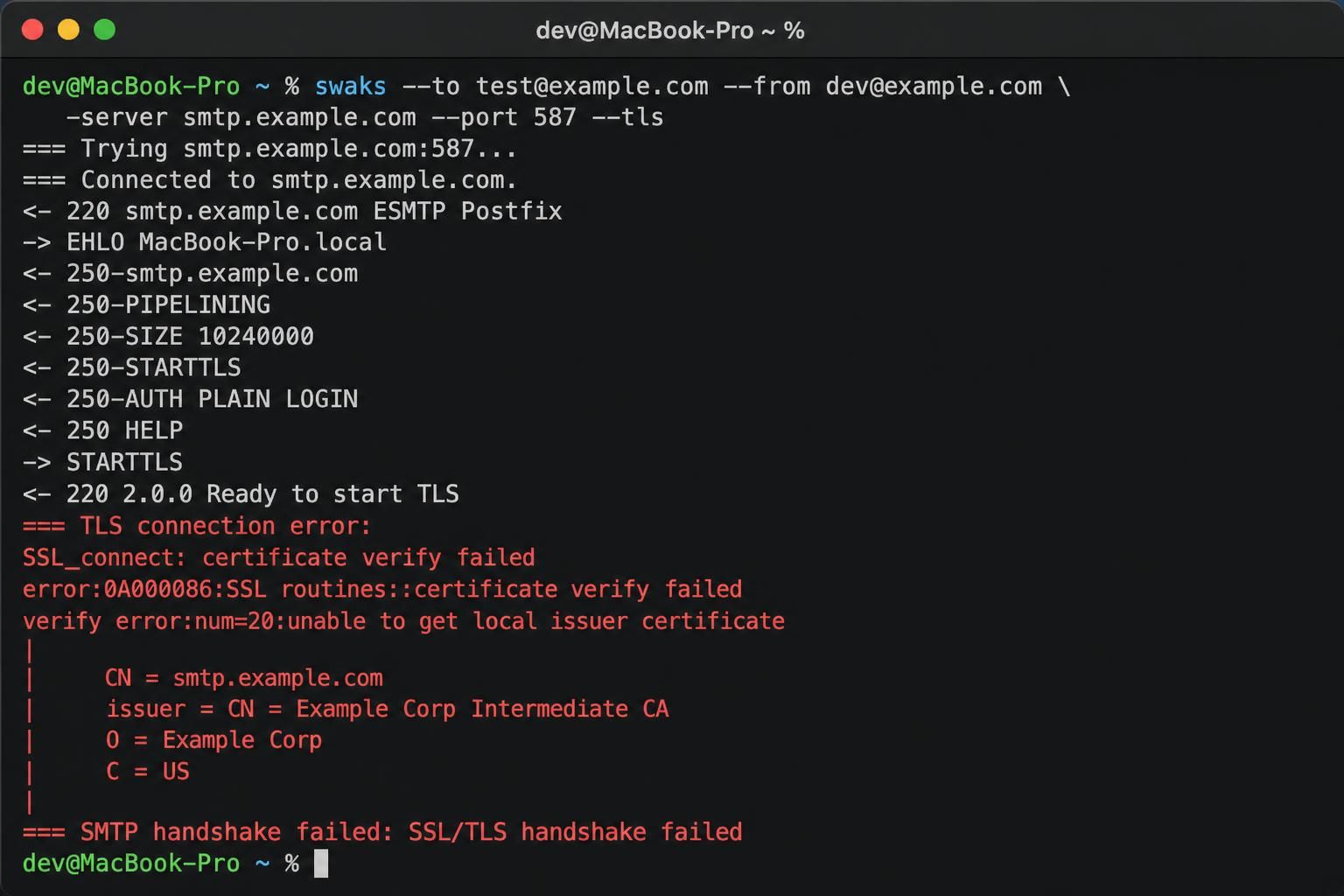
Diagnostic output showing errors such as “STARTTLS failure”, “certificate verify failed”, or SSL warnings points clearly toward encryption layer problems rather than basic connection or DNS issues. These errors occur during the handshake when PHPMailer upgrades the connection security from plaintext to TLS or SSL.
Common reasons include:
- Mismatch between the SMTP port and encryption method (e.g., using port 587 without STARTTLS or port 465 without SSL).
- Expired or untrusted SMTP server certificates.
- Missing or incorrect certificate authority (CA) bundles on the host.
- Self-signed certificates not recognized by PHP or OpenSSL.
It is essential in PHPMailer configurations to match port numbers with the recommended protocol:
- Port 587: Usually paired with
PHPMailer::ENCRYPTION_STARTTLSwhere STARTTLS upgrades an unencrypted TCP connection to encrypted. - Port 465: Used for implicit SSL via
PHPMailer::ENCRYPTION_SMTPS.
Failing to pair these settings properly triggers connection failure during encryption negotiation before authentication starts. Debugging this requires looking closely at the SMTPDebug output to spot certificate issues as well.
Verification steps include:
- Ensure PHP’s OpenSSL extension is enabled and up to date.
- Use system or cPanel certificate stores trusted by PHP.
- When testing, toggle
$mail->SMTPDebug = 2;in PHPMailer to visualize the SSL/TLS handshake steps. Learn more about interpreting debug output in the SMTPDebug reference article.
Test Method to Identify TLS/SSL Issues
Set PHPMailer’s SMTPDebug to a verbose level and examine whether the connection attempts STARTTLS handshake or SSL negotiation but abort due to certificate errors or failed negotiation. This observation isolates encryption faults from DNS and port blocks.
Special Cases: Hosting Policies and Environment-Induced “SMTP connect() failed” Scenarios
When the same PHPMailer configuration functions locally but fails on shared hosting or cPanel environments, the root cause often lies in host-imposed limits, policy blocks, or account restrictions. This is a prevalent hurdle in 2026 as shared hosting providers increasingly tighten outbound SMTP to reduce spam and security risks.
Typical failure modes include:
- Firewall restrictions that block outgoing SMTP ports.
- Hosting providers disabling authenticated SMTP relay from PHP processes.
- Limits on the number of SMTP connections or messages per hour/per day.
- Cloud firewalls or network security gateways set up on the hosting infrastructure.
How to diagnose this situation?
- Confirm if your SMTP configuration and credentials work from other environments or local machines but fail on the hosting server.
- Request your hosting technical support or documentation to clarify SMTP relay policies, permitted ports, and PHP mail restrictions.
- Check for environment variables or PHP extensions disabled that may impact SMTP authentication or encryption.
In some instances, switching to third-party mail sending services with API-based email sending or using SMTP relays allowed explicitly by the host circumvents these blocks efficiently. However, it is always advisable to verify the policy before changing credentials or mail clients.
Test Approach to Confirm Hosting or Environment Limitations
Run the PHPMailer SMTP Debugger with identical config and look for consistent connection failures only on the hosting server. Combine this with port checks and host support confirmation to isolate this case.
| Diagnostic Evidence in SMTPDebug Output | Likely Cause | How to Confirm |
|---|---|---|
| “getaddrinfo” failure or “Name or service not known” | Incorrect SMTP Hostname or DNS resolution failure | Ping or Nslookup on SMTP host from server |
| “Connection refused” or no SMTP banner | Port blocked, wrong port or host firewall blocking | Telnet or Netcat test on ports 587, 465, 2525 |
| STARTTLS failure or TLS certificate errors | Encryption protocol mismatch or certificate trust failures | PHPMailer SMTPDebug verbose output focused on TLS handshake |
| Authentication failure after SMTP banner | Wrong credentials or SMTP authentication failure | Occurs after stable connection: move to authentication diagnostics |
| Works locally, but fails on shared hosting | Hosting policy/firewall blocks SMTP | Host support confirmation and network policy inquiry |
By systematically following these diagnostic checks, diagnosing PHPMailer’s “SMTP connect() failed” error becomes methodical and targeted, avoiding time-consuming guesswork.
What does ‘SMTP connect() failed’ indicate in PHPMailer?
It means PHPMailer could not establish or upgrade a connection with the SMTP server enough to proceed to authentication, often due to DNS, port, or encryption issues.
Can changing SMTP password fix ‘SMTP connect() failed’?
No, if PHPMailer doesn’t reach the authentication stage, updating the SMTP password won’t resolve the connection failure.
How to use SMTPDebug to diagnose connection failures?
Set PHPMailer’s SMTPDebug to verbose levels (e.g., 2) to trace the connection process step-by-step and identify where the failure occurs in DNS resolution, TCP connection, TLS handshake, or authentication.
Why does SMTP connect succeed locally but fail on shared hosting?
This discrepancy often stems from outbound SMTP port blocking or relay restrictions on the hosting provider’s network or firewall policies.
Which port and encryption settings pair correctly in PHPMailer?
Port 587 should be paired with STARTTLS (PHPMailer::ENCRYPTION_STARTTLS), and port 465 with implicit SSL (PHPMailer::ENCRYPTION_SMTPS).
