
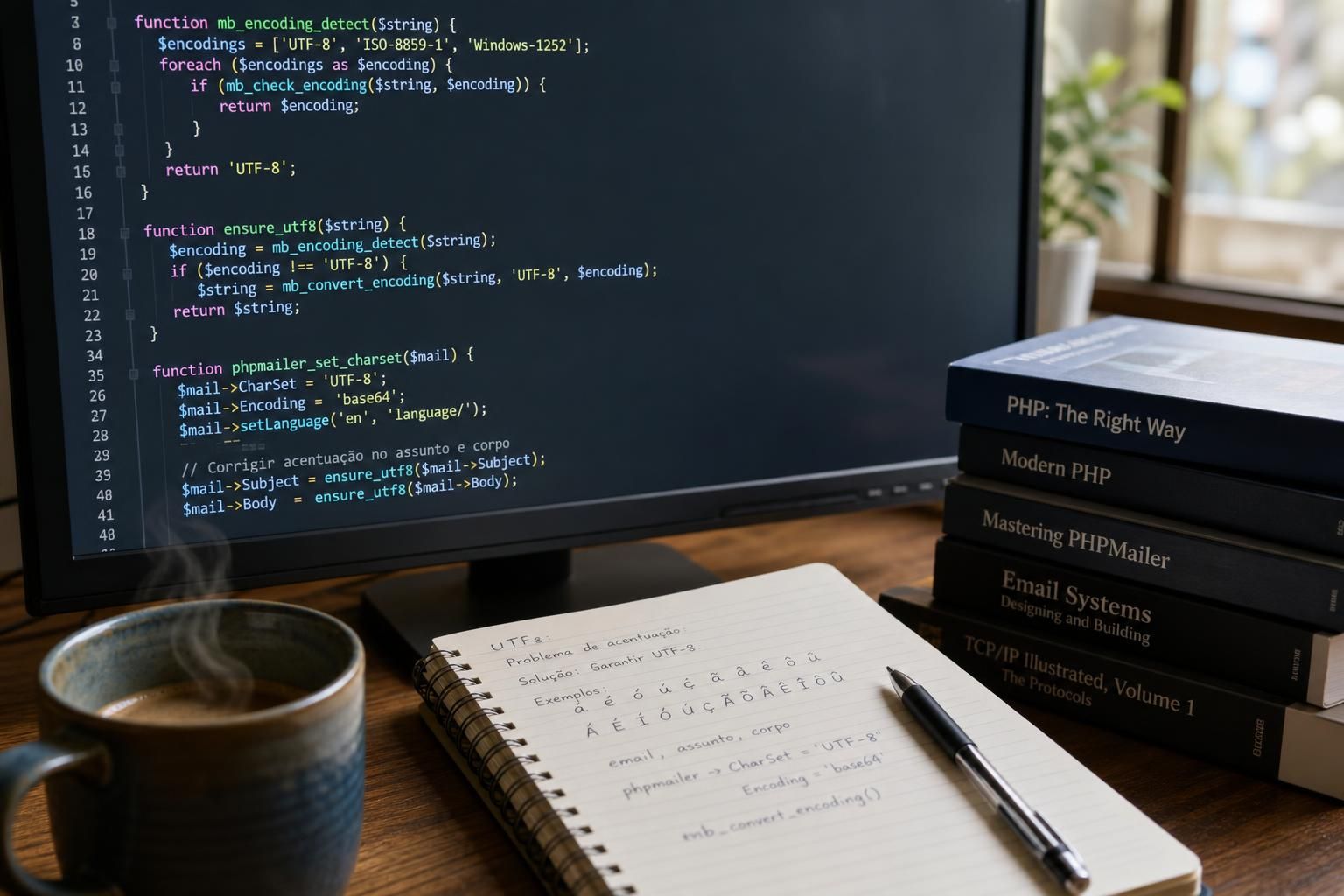
Emails sent via PHPMailer often display corrupted characters, especially when accented letters are involved, sparking confusion among developers and marketers alike. These encoding mishaps primarily arise due to misconfigurations in character set declaration and multipart MIME definitions within the email’s headers. As email clients evolve, proper UTF-8 support is no longer a luxury but a necessity to ensure consistent rendering of international characters. This complexity intensifies with PHP applications that handle multibyte characters and diverse content encodings, making it crucial to understand the underlying protocols and effective resolutions.
Emails are composed of headers and body content transmitted over SMTP protocols, which require explicit declarations of character sets and content encodings. UTF-8 is the most comprehensive and widely adopted encoding standard supporting a plethora of languages and special characters, including French accents and other diacritics. When PHPMailer does not correctly set or enforce UTF-8 character encoding in its headers, recipients’ email clients often fallback to default encodings like ISO-8859-1 or US-ASCII, leading to garbled displays such as à or ê instead of é or ê.
Charge d’affaires agencies, online retailers like boutique e-commerce platforms, and global mailing services struggle daily with these issues. Irregularities in encoding cause mistrust or miscommunication, especially when linguistic accuracy matters. Therefore, troubleshooting character set problems by inspecting the Content-Type header, ensuring proper SMTP configurations, and validating that message subjects and bodies are correctly encoded in UTF-8 is essential.
How Incorrect or Missing CharSet Declaration Causes UTF-8 Encoding Failures in PHPMailer
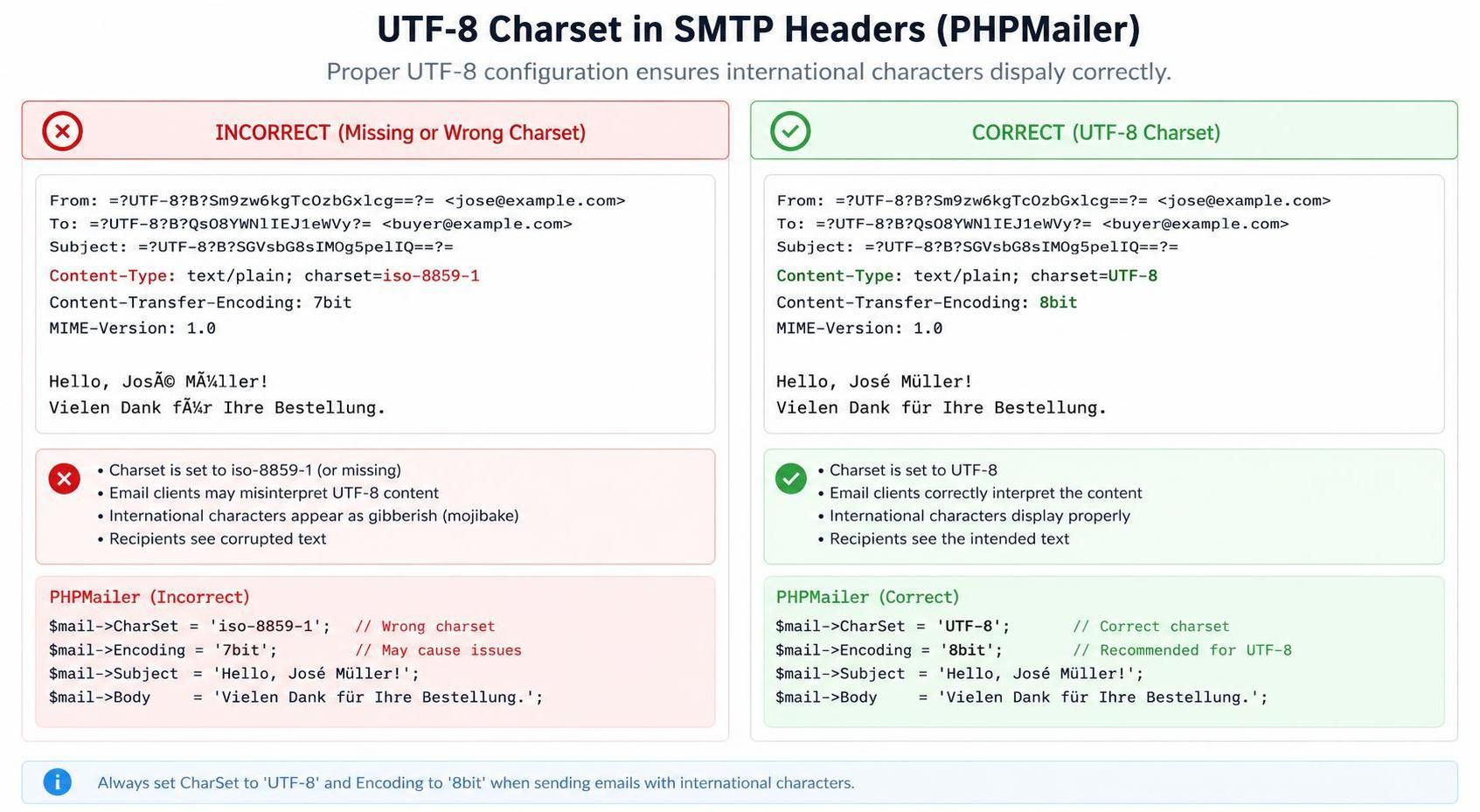
The error pattern of accented characters displaying incorrectly in PHPMailer fundamentally stems from a flawed or absent CharSet setting. At the SMTP level, the Content-Type header tells the email client what character set the message content uses. If the header is missing or specifies an incompatible charset like iso-8859-1, accented UTF-8 characters appear as a sequence of nonsense glyphs.
To confirm that an encoding mishap is due to CharSet settings, developers should inspect the raw email headers for the Content-Type declaration. An example of what to look for is:
Content-Type: text/plain; charset=iso-8859-1
Or it might be missing entirely. In contrast, the correct header for UTF-8 encoded content must include:
Content-Type: text/plain; charset=UTF-8
PHPMailer requires explicit assignment of the CharSet property to “UTF-8” to ensure proper encoding. Without this, the default, which might be incompatible with your content, will be used. It is also critical to pair this with a proper Encoding method, such as “base64” or “quoted-printable,” to manage multibyte characters efficiently.
A practical test to isolate this cause involves sending a simple email with only ASCII characters but with improper CharSet settings; if the recipient sees accurate text, the issue is likely character-set related for multibyte characters. Further verifying the same email with accented characters will show errors only if CharSet is mishandled.
In addition, misdeclaration of the character set in the Email Headers can interfere with how mail servers process and relay messages, propagating the encoding error. Thus, tweaking PHPMailer’s CharSet property and validating the headers is the first and foremost step to eliminating corrupted accent displays.
Subject Line Encoding Issues: Why Accents Often Get Garbled in Email Subjects
One frequent manifestation of encoding problems in PHPMailer is the garbling of accented characters in the email subject line. While the body may display correctly, accented characters in the subject such as “Résumé” can become “RÃsumÔ due to improper MIME header encoding.
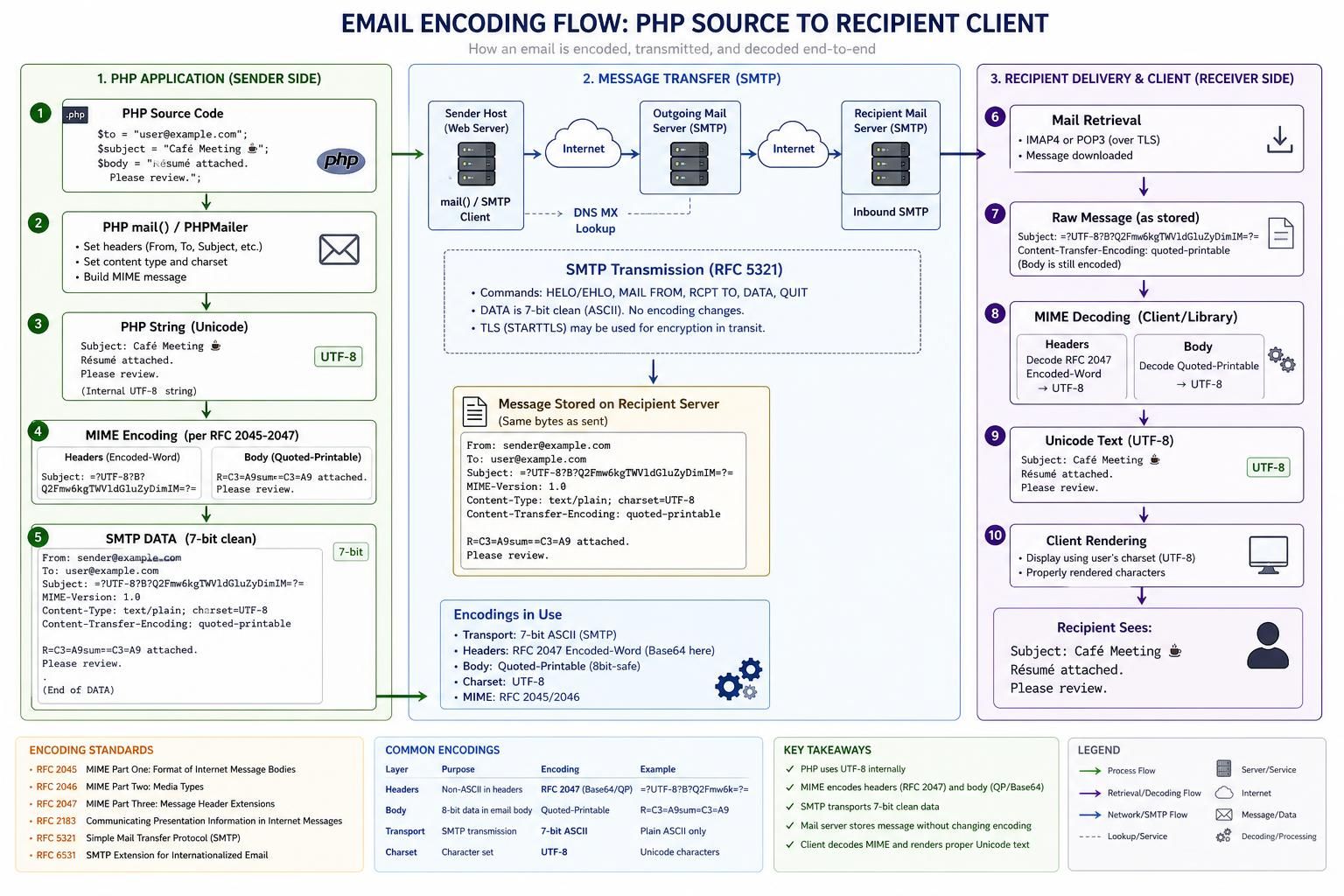
The core of this problem lies in the fact that email subjects are transmitted as part of the header, which mandates MIME-encoding of non-ASCII characters. PHP’s built-in string functions do not automatically handle this, so PHPMailer must correctly encode the subject using MIME header encoding schemes such as “=?UTF-8?B?” (Base64) or “=?UTF-8?Q?” (Quoted-Printable).
For confirmation, inspect the raw email headers for a subject line which should look like:
Subject: =?UTF-8?B?UsOpc3Vtw6k=?=
Instead of:
Subject: Résumé
Which will cause encoding errors in most mail clients not set to UTF-8 by default.
PHPMailer includes functionalities to encode the subject properly, but some developers miss invoking or setting this explicitly. The test to distinguish this cause is to send emails with accented characters only in the subject and no body content. If the corruption appears, the subject encoding is the suspect.
Resolving this involves configuring PHPMailer to use appropriate MIME header encoding for subjects. This often requires setting the CharSet and confirming that the subject is processed with the proper encoding method, usually handled internally by PHPMailer when configured correctly.
Improper Content-Transfer-Encoding Leading to Multibyte Character Corruption in PHPMailer Emails
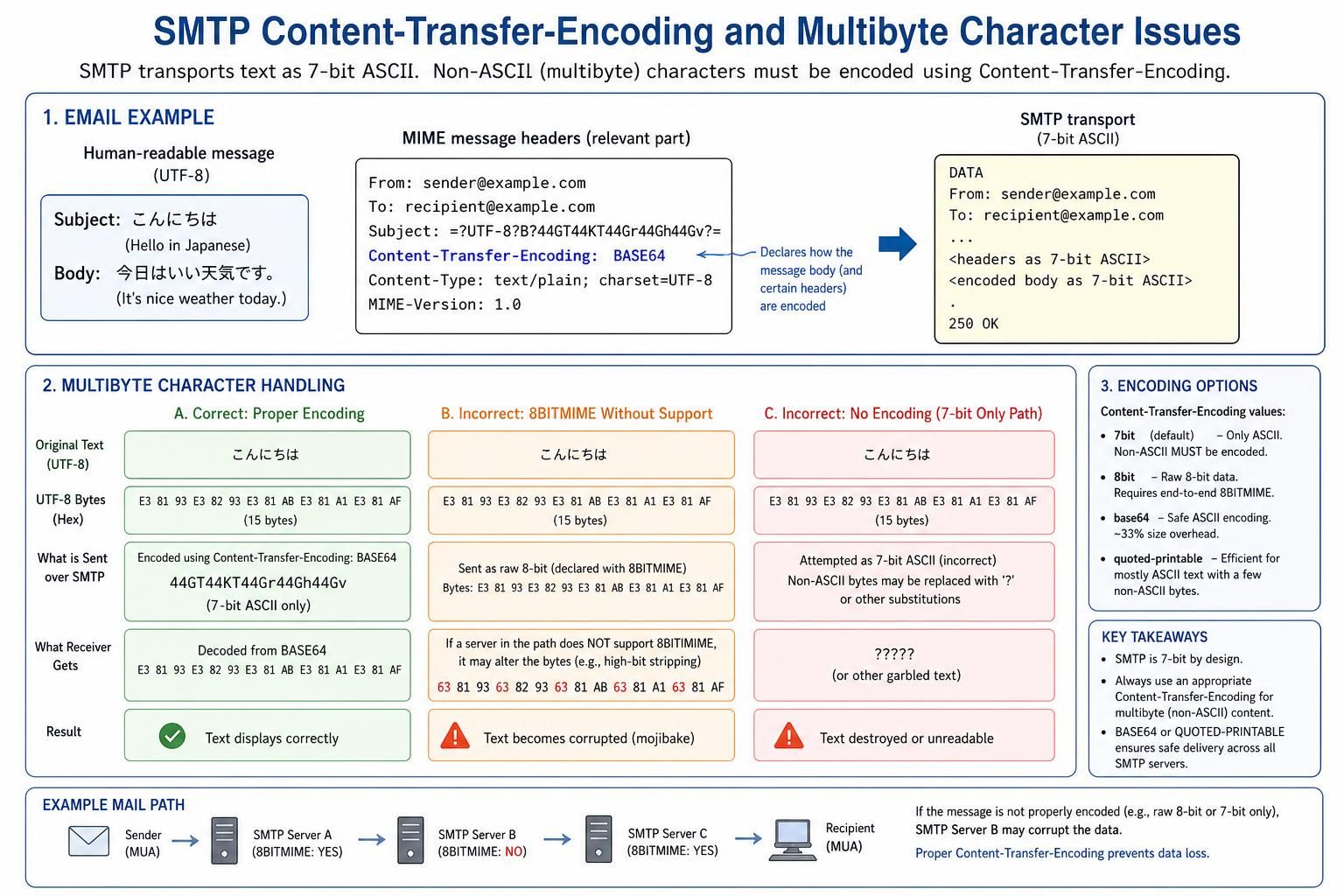
The Content-Transfer-Encoding header specifies how the email body is encoded to handle transmission over SMTP which fundamentally supports 7-bit ASCII only. Multipart and multibyte characters, including accented letters, require encoding schemes like Base64 or Quoted-Printable to be reliably transmitted.
Failure to specify the correct Content-Transfer-Encoding can cause characters outside the ASCII range, such as é or ç, to be corrupted or replaced by sequences like à in the recipient’s email client. This degeneration happens not at the SMTP protocol level but during interpretation by the receiving client due to the missing or wrong encoding signal.
To identify this cause, check the email source for:
Content-Transfer-Encoding: 7bit
Or no explicit encoding at all. This scenario is a telltale sign that multibyte characters will not transfer correctly.
Correct configuration demands setting:
Content-Transfer-Encoding: base64
Or
Content-Transfer-Encoding: quoted-printable
Depending on the content type and PHPMailer’s configuration.
The distinction here can be tested by sending a message with accented content in different encodings and verifying whether the rendering preserves character integrity. Base64 is commonly preferred for HTML or binary attachments, while quoted-printable suits text-heavy emails where readable source is desired.
Mixed Content and Encoding Mismatches: When HTML and Plain Text Parts Collide
PHPMailer supports multipart MIME messages that combine HTML and plain text versions of emails. Encoding inconsistencies between these parts often cause accented characters to render incorrectly. For instance, the HTML part might be encoded with UTF-8 and base64, but the plain text part could lack proper charset declaration or carry a different encoding.
This disparity confuses email clients, which select one part to display, causing inconsistent or corrupted accent displays. Verification involves analyzing both MIME parts within the raw message. The Content-Type headers for each part must explicitly specify the same charset (preferably UTF-8) and match content transfer encoding.
| Mime Part | Content-Type Header | Content-Transfer-Encoding | Effect on Accents |
|---|---|---|---|
| HTML | text/html; charset=UTF-8 | base64 | Correct accented display |
| Plain Text | text/plain; charset=iso-8859-1 | 7bit / missing | Incorrect accent rendering |
The test here involves sending only multipart messages and switching the email client’s view between plain text and HTML. If accents suffer in one but not the other, mismatched encoding across MIME parts is confirmed.
Correct handling requires setting uniform CharSet and Content-Transfer-Encoding for both parts of the message within PHPMailer’s API. Leveraging consistent UTF-8 encoding prevents discrepancies and ensures accents appear accurately regardless of the display mode.
When Standard Fixes Fail: Complex Failure Modes of UTF-8 Accents and Encoding in PHPMailer
There are uncommon yet significant cases where ostensibly correct configurations still result in accent corruption in PHPMailer emails. These complex failure modes stem from:
- Interference by Mail Servers or Gateways: Some SMTP relays or security appliances modify headers or re-encode content, negating PHPMailer’s settings.
- Incorrect Source File Encoding: If the PHP source code files are not saved in UTF-8 without BOM, strings passed to PHPMailer might already be corrupted.
- Database Encoding Mismatch: Fetching accented text from databases with a different character set (e.g., latin1) without conversion leads to garbled content.
- Third-party Libraries or CMS Integration: Misconfiguration in CMS plugins or extensions can override PHPMailer’s charset and encoding properties.
Confirming these causes demands isolating the email generation environment. Testing with hardcoded UTF-8 strings in standalone PHPMailer scripts helps distinguish source or transport layer issues from application logic problems.
Sometimes enabling debug output within PHPMailer (refer to the SMTPDebug feature) reveals hidden transformations or truncated headers that impair encoding integrity.
Resolving these failure modes often requires a approach: ensuring all application layers, from PHP scripts to databases and SMTP servers, uniformly adopt UTF-8 encoding. patching or configuring third-party components to respect standard encoding parameters is essential.
How do I set UTF-8 encoding in PHPMailer for both the subject and body?
Set PHPMailer’s CharSet property to ‘UTF-8’ and ensure that both the subject and body text strings are encoded properly. PHPMailer automatically encodes the subject when CharSet is set, but verifying MIME header encoding is recommended.
Why do accented characters appear as strange symbols after sending emails with PHPMailer?
This is usually caused by a mismatch between the actual character encoding of the message content and the declared charset in the email headers. The lack of proper Content-Type charset or wrong Content-Transfer-Encoding often causes this.
How can I test if multipart encoding issues are causing my email accent problems?
Send emails as multipart with both plain text and HTML parts, then check each part’s encoding and charset in the raw email source. View emails in different clients and switch between plain and HTML views to detect disparities.
Can SMTP servers change or corrupt the encoding of sent emails?
Yes, some SMTP servers or security gateways modify headers or re-encode messages, which can override or break the encoding set by PHPMailer. Enabling SMTPDebug and reviewing logs can help identify such interferences.
Is saving PHP source code files in UTF-8 necessary for proper email encoding?
Absolutely. Source files must be saved in UTF-8 without BOM to preserve the integrity of multibyte characters when composing email content with PHPMailer.
